Intro
Intro
In my previous blogpost, we explored the challenges with relying on terraform registry modules for code sanity checks. Additionally, we reviewed OCI iam-compartment module and I shared my revised version in my Github.
Today, we'll demonstrate how to deploy multi-level OCI compartments using my local module (iam-compartment), which you can easily clone from my GitHub Repo.
Why multi level compartments ?
Oracle Cloud landing zone reference architecture recommends a multi-layer compartment design, reflecting the functional structure observed across different organizations. With this approach, IT responsibilities are efficiently separated among networking, security, application development, and database administrators.
Use case and Topology
Let's say our business is a Mediterranean fast food franchise called "La Dolce Pita". Their application goal is for customers to find nearby restaurants, order ahead, receive updates, and enjoy rewards.
Following Cloud Adoption Framework (CAF) Landing Zone of OCI, we'll need a robust foundation, ensuring full control and isolation over the tenancy. Which is why multi level compartments comes into play.

The workload compartment is our LDP application which will share common infrastructure resources such as identity domains, FastConnect, Cloud Guard targets, and so on.
Overview
The final design includes 3 level compartments segregating operational duties and resources .
Level 1: - under the root compartment
LDP Top enclosing compartment for the workload sitting
Level 2: - under the LDP compartment
LDP Shared compartment hosting shared resources such as monitoring VMs, Bastion hosts, Windows Domain Controllers (DC), backup endpoints, etc..
LDP-Network compartment hosting all network resources like VCNs, subnets, DRGs, etc.
LDP-Security compartment hosting security related resources (Key Vault, cloud guard, audit,..)
LDP-App compartment : enclosing all the application resources & compartments (front/back)
Level 3: - under the LDP-app compartment
LDP-app-prod the production environment resources
LDP-app-dev the development environment resources (we can have many more like QA/test)
LDP-app-dr literally the DR tier in a neighbor region
LDP-app-db backend databases (DBCS, Exadata, Autonomous DB, MySQL, PostgreSQL)
Which module are we using?
It’s my revised version of the official OCI iam-compartment, located in my GitHub under iam-compartment folder.
Local modules are good as it allows a single copy use for all your calls, including dynamic blocks.
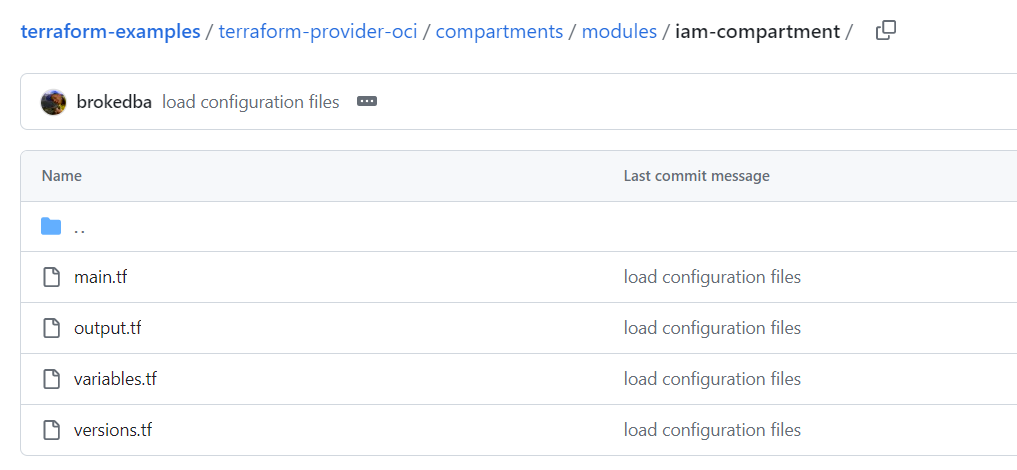
See below call example with the module attributes. module "My_compartments" {
source = "./modules/iam-compartment"
#tenancy_ocid = var.tenancy_ocid # optional
compartment_id = var.comp_id # Parent compartment
compartment_name = var.comp_name
compartment_description = var.comp_description
compartment_create = true
enable_delete = true
}
Deploying Multi level compartments
Clone the repository
This is my own github repo, Pick an area on your file system and run the clone command
Cd Into the subdirectory where our configuration resides and run the init
$ cd   ~/terraform-examples/terraform-provider-oci/compartments
$ terraform init
Here’s a tree of the files composing our configuration
$ tree
  .
  |-- variables.tf     ---> Resource variables needed for the deploy including locals
  |-- compartments.tf  ---> Our main compartment resource declaration
  |-- output.tf        ---> displays the compartments detail at the end of the deploy
  |-- terraform.tfvars.template---> environment_variables needed to authenticate to OCI
  |-- modules
  |   ├── iam-compartment
  │   |   ├── main.tf
  │   |   ├── output.tf
  │   |   ├── variables.tf
  │   |   ├── versions.tf
  └── modules.json  --> file mapping the modules and their corresponding resource blocks.
Using locals and dynamic blocks
By using local variables, I stored the display names of all my sub compartments. This allows for a single dynamic block per compartment level and a to use for_each loop to create all the compartments efficiently.
The enclosing compartment “LDP” will use a normal resource block and not the module to keep it simple.
But all sub compartments will leverage our module by using one dynamic block per level
level_1_sub_compartments: for all level 1 compartments
level_2_sub_compartments: for all level 2 compartments

1. Execution plan
Run terraform plan (see below excerpts of a level1 resource block referencing the module).
#Adjust terraform.tfvars.template with authentication parameters & rename it to terraform.tfvars
$ terraform plan
.Terraform will perform the following actions:
… snip
# module.level_2_sub_compartments[LDP-app-db].oci_identity_compartment.this[0]
will be created
+ resource "oci_identity_compartment" "this" {
+ compartment_id = (known after apply)
+ defined_tags = (known after apply)
+ description = "Database instances and resources"
+ enable_delete = true
+ freeform_tags = (known after apply)
+ id = (known after apply)
+ inactive_state = (known after apply)
+ is_accessible = (known after apply)
+ name = "LDP-app-db"
+ state = (known after apply)
+ time_created = (known after apply)
}
...
--- OTHER remaining resources
Plan: 9 to add, 0 to change, 0 to destroy.
…
2. Deployment (Apply)
And here you 9 resources created among which 1 main compartment and 8 sub compartments in two levels.
# Original output was truncated for more visibility
$ terraform apply -–auto-approve
oci_identity_compartment.iam_compartment_main: Creating...
module.level_1_sub_compartments["LDP-network"].oci_identity_compartment.this[0]:Creating..
module.level_1_sub_compartments["LDP-app"].oci_identity_compartment.this[0]: Creating...
module.level_1_sub_compartments["LDP-security"].oci_identity_compartment.this[0]: Creating...
module.level_1_sub_compartments["LDP-shared"].oci_identity_compartment.this[0]: Creating...
module.level_2_sub_compartments["LDP-app-dev"].oci_identity_compartment.this[0]:Creating...
module.level_2_sub_compartments["LDP-app-prod"].oci_identity_compartment.this[0]:Creating...
module.level_2_sub_compartments["LDP-app-dr"].oci_identity_compartment.this[0]:Creating…
module.level_2_sub_compartments["LDP-app-db"].oci_identity_compartment.this[0]:Creating...
Apply complete! Resources: 9 added, 0 changed, 0 destroyed.
Outputs:
l1_sub_compartment = {"comp_name" = "LDP-app"}
l1_sub_compartments= {
"LDP-app" = ocid1.xx => Desc: Parent compartment for all application resources"
"LDP-network" = ocid1.xx => Desc: for all FW, VCNs and LBRs"
"LDP-security" = ocid1.xx => Desc: for Security related resources like Vaults, keys"
"LDP-shared" = ocid1.xx => Desc: for shared services like AD DC, Monitoring"
}
l2_sub_compartments = {
"LDP-app-db" = ocid1.xx => Desc: Database instances and resources"
"LDP-app-dev" = ocid1.xx => Desc: non-production VMs"
"LDP-app-dr" = ocid1.xx => Desc: DR VMs"
"LDP-app-prod" = ocid1.xx => Desc: production VMs"
}
main_compartment = {
"Comp_name" = "LDP"
"comp_desc" = "Enclosing compartment at root level"
"comp_ocid" = "ocid1.xx"
}
You can see the end result in the below console view

Conclusion:
We have just demonstrated how to quickly deploy a multi level compartments using terraform in OCI
Remember that all used attributes in this exercise can be modified in the variables.tf output.tf files.
This also allows to follow OCI landing zone recommendations for control & isolation of each workload
local modules not offer the same modularity in registry modules, but is even more powerful as since it allows to reuse a single module copy for all the calls, including dynamic blocks.
Using local variables to feed the the dynamic blocks allowed to have only 2 blocks for 8 compartments reducing drastically the foot print of our code (on top of reusing a unique copy of the module)