Tuesday, July 20, 2021

Interview With Oracle FPP head Ludovico Caldara


I want to thank Ludovico Caldara [FPP & Cloud MAA Product Manager @Oracle] for accepting the publication of this interview which is based on a conversation we had some time ago. It is mainly focused on the Oracle Fleet Patching and Provisioning (FPP) “FUNDAMENTALS”, but I hope this could help the community to glean a better understanding as to which is which and which does what within its Architecture before trying their labs.

Note
: If you want to check the hottest news about FPP, please jump to the 4th section What’s cooking for FPP

Main Topics

 1. Storage options for provisioned Software
2. Client/Server relationship
 3. Upgrade in FPP
 4. What’s cooking for FPP in 2021
      ○  Helpful resources


                                                                -- ⚜  “Latin Greetings”  ⚜ --                                                                    

[BrokeDBA]
Ciao Ludovico, come stai! Grazie per aver accettato questa intervista.

[Ludovico]
Ciao BrokeDBA, tutto bene grazie. Grazie a te per l’invito!

                                                              …                                                                    

I. Storage Options for Provisioned Software

[BrokeDBA]
First, I recently read a section in the FPP technical brief where they stated something like the below

This image has an empty alt attribute; its file name is image-5.png

My Question is what does “FPP managed” storage change really for provisioning?
Does that mean if the storage is FPP managed, it can't store and provision grid images ?

[Ludovico]
The option to provision software “LOCAL” or “FPP_MANAGED” is related to the possibility of using ACFS on the client to store a copy of the gold image locally to the client and add the working copy as an ACFS snapshot.

So from there, any working copy that you want to provision out of the same gold image (or image series), will be provisioned as ACFS snapshot of the corresponding image (see link)

  • What changes on the client is that if you provision to a “LOCAL” filesystem, you have to care about it (its existence, size, etc.), and every working copy based on the same image will be a full copy occupying space.
  • If you provision to FPP_MANAGED, you just need to provision a diskgroup with enough capacity, and the ACFS filesystems and snapshots are created/managed automatically by the FPP client.

The dependency with ACFS makes it impossible to have working copies of Grid Infrastructure using RHP/FPP_MANAGED.

The image management on the FPP server does not change, you can import and manage GI images or DB images on the FPP server, they’ll always go in the ACFS filesystem.

-- Follow-up

[BrokeDBA]
So it’s not a provisioning limitation for simple target servers but only for FPP clients? We could still provision working copies of GI gold images stored in the FPP server,  just not on an FPP_MANAGED storage if the destination is an FPP server or client  correct?   

[Ludovico] Correct.

[BrokeDBA]
Does it mean I can only add DB home working copies to an FPP_MANGED storage in the FPP servers’ ACFS system? 

[Ludovico]
I was referring to images, not working copies. I’ll try to schematize it here:
This image has an empty alt attribute; its file name is image-1.png

(*) when provisioning DB Working Copies on FPP_MANAGED, the base ACFS file system contains a copy of the image, but you cannot "add image" to a client

[BrokeDBA]
So all GI working copies need to be LOCAL, cue the mandatory -path option ?

[Ludovico] Correct.


II. Client/Server Relationship

[BrokeDBA]
Now back to FPP clients, what kind of relationship is there between an FPP client & the FPP server in terms of role and content?

  • From the documentation I could read the following

This image has an empty alt attribute; its file name is image-8.png

  • A bit further

Is HA the reason behind Client/Server architecture or could you clarify this relationship a bit more?

[Ludovico]  
These two statements are a bit unrelated. The first says that to promote a cluster as FPP client (and not just target), you need at least GI 12.2 if the server is 19c. If you have GI 12.1 on the client, it cannot become a client but will stay an unmanaged target. The difference is that the client is “registered” and further operations on it do not require root password anymore.
The client/server relationship is established once and for all, with credential wallets, when doing “add client/ add rhpclient”). Also, once a cluster becomes FPP client, it can trigger actions on its own (if the local user has the correct roles).

The second statement just suggests that the FPP server should be highly available so that FPP server stays available in case of server failure. As it says, not mandatory but recommended.

[BrokeDBA]
Does the client store images like any FPP server, or just uses the FPP server’s repository for creating working copies?

[Ludovico]  
The second, Clients do not store their own images, they always get them from the server.

[BrokeDBA]
What does FPP_MANAGED storage option mean in practice for FPP client environment provisioning?

  • Option 1
    Add a DB working copy snapshot after importing the image from the FPP server to a local ACFS , (total size = image + snapshot)?

  • Option 2
    Add a DB working copy as  a snapshot directly from FPP server’s ACFS image without having to import it first, (total size = snapshot)?

[Ludovico]

  • Option 1:  Exactly, the import of the image and the creation of the snapshot are implicit with the ”add workingcopy” command.

  • Option 2:  No, this was possible in 12.1 (NFS working copy provisioning), but it has been dismissed because NFS availability was a concern more than a solution.


III.
Upgrade in FPP

[BrokeDBA]

Let's say we have an existing 12c non CDB (non working Copy) installed and wish to migrate it to 19c CDB.
In a normal world (non FPP) we usually have the below options (see
19c migration white paper)

This image has an empty alt attribute; its file name is image-4.png

Which scenarios are available in an FPP environment (i.e. : FPP Server + FPP Target having 12c NonCDB DB) that allow us to do the same migration in question (Non CDB 12c to 19c CDB)?
Early documentation wasn’t very clear for me on that scenario, is multi tenant conversion supported too?

[Ludovico]
You can use Fleet Patching and Provisioning to upgrade CDBs but 19c Fleet Patching and Provisioning does not support converting a non-CDB to a CDB during upgrade.

Up to 19c, FPP uses DBUA and DBCA in the backend for database upgrade and creation. If you need to have special templates for DBCA you can create the templates in the Oracle Home and create the gold image from that. From that moment, the working copies provisioned from that image will have the template that you need.

[BrokeDBA]
I realized that a local database on a FPP target doesn’t have to be a working copy to be upgraded with FPP but we can have a new copy created on the fly during the upgrade using “-image” option.
Could you tell more about this feature?
Syntax: rhpctl upgrade database  … [-image 19c_image_name [-path where_path]]      

[Ludovico]
Correct, that’s also in the 19c doc.

“ …. If the destination working copy does not exist, then specify the gold image from which to create it, and optionally, the path to where to provision the working copy.”


IV. What’s Cooking for FPP

[BrokeDBA]
I have an idea about what’s hot lately for FPP but could you elaborate more about the exciting news that are in store for FPP in 2021 and beyond?

[Ludovico]

Fleet Patching and Provisioning 21c comes with support for the Autoupgrade tool. This simplifies the preparation, execution and the troubleshooting of upgrade campaigns. The feature will be hopefully backported to 19c.

As more and more customers migrate their fleet to Exadata Cloud Services and Exadata Cloud at Customer, the next big development will be toward integrating fleet patching capabilities in the OCI service portfolio. Today, patching cloud services with the on-premises version of FPP is not supported.

For the long-term vision, FPP will be the core of all database fleet patching operations within Oracle. It will be critical to make it easier to implement and maintain, so expect improvements in this direction for the future releases. Sorry, I cannot tell more :-)

Helpful resources

Sunday, December 27, 2020

My Vagrant fork of Oracle Fleet Patching and provisioning (FPP)


Intro

I have been asked to read about Oracle database fleet management at work but the turnoff was that it relied entirely on OEM. Aggregating both functionalities makes provisioning, in my opinion, cumbersome and unattractive for shops that only want to manage the fleet. Luckily for me, I got acquainted with an even better framework that’s dedicated to manage the provisioning and patching of fleets of targets (DBs & Grids). It’s called Fleet Provisioning and Patching (formerly Rapid Home Provisioning).

Keep my GitHub repo close before reading further : https://github.com/brokedba/OracleFPP

Advantages :

  • Seamless provisioning, patching, and upgrading
  • Agile (less code, out of place deployment, Zero downtime support ie : Goldengate/DG)
  • Increases automation and less heavy to implement (reduced technical debt)
  • Doesn’t rely on OEM (only Grid) nor require an EM license (free with RAC/[One-node])

To my surprise, I assimilated more in an hour of reading FPP than days spent digging on Database fleet Documentation.

When Oracle FPP meets Vagrant\VirtualBox

By the end of 2019, Oracle did the perfect move by making FPP framework accessible to the community through virtualbox. A new vagrant build was added to their vagrant projects in Github and now, with a simple “vagrant up you can try FPP on your own laptop. The build was created by Ruggero Citton from RACPack/MAA team and allows either of the below setups:

  1. Setup an Oracle FPP Server and (Optional) FPP Target on host-only (private) Virtualbox network
  2. Setup an Oracle FPP Server (only) on public network (to be used with targets on your own network).  

Note: Beside VirtualBox, the build also includes support for libvirt KVM provider      

What’s in it for you with my fork

I was supper excited to test FPP using my favorite devops tools, so I deployed the lab and succeeded to run few tasks like importing 19c database and grid software images, creating working copies, and adding a database using rhctl command.
But what if my environment has only 12c Oracle homes? how could I leverage this FPP lab to manage a 12c fleet ?  

For this reason and after few exchanges in GitHub, I decided to create a GitHub fork build that includes scenarios proper to 12c Oracle Homes where one could

  • Import an image from an existing 12c database home to the FPP server and do some patching tests
  • Upgrade from an existing 12 target db home to a 19c working copy
  • Anything else that can be tried with a 12c database home using FPP

Build details

Although all of the content is available on Github’s Read.me Page , I will try to share the relevant part in this article to add more context to the reader. 

1. Disk space requirement

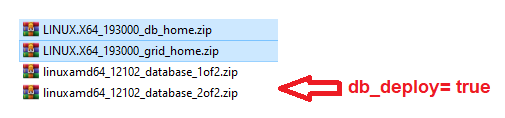
  • Software zipped binaries for 19c Grid , 19c & 12c Database  under "./ORCL_software": ~8.3 Gb.
  • FPP server : 2 OS  vdisks (should be 1 but original vagrantfile has 2) => actual size :  ~2 Gb (max 50)
  • FPP server : Grid Infrastructure on fpps_u01 vdisk  =>  actual size : 12GB  (max 100)
  • FPP server : 6x shared  asm vdisks  =>  actual size : ~40GB  (max 60)

    Below storage needed if host 2 and 12c database are deployed  

  • FPP target : 2 OS  vdisks (should be 1)  => actual size :  ~6 Gb (max 50)
  • FPP target : fppc_u01 vdisk for working copies => actual size : ~13GB (max 100)
  • FPP target : I added fppc_u02 vdisk  for existing 12 database oradata  => actual size : ~5GB (max 100)

   Total space with an existing 12c database and 19c working copy in the FPP target, along with two images on the FPP server
    is  ~78GB

2. Memory

  The minimum required is 18GB (12 for the FPP server and 6 for the FPP target). Consider 12 only if the target is not deployed.

3. The expecting Oracle software


Customization

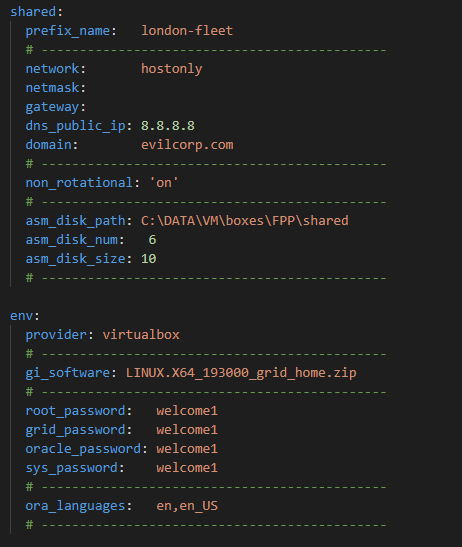
You can customize the environment by editing the parameters in the configuration file:"vagrant.yml" but there is another file that holds the core configuration of our vagrant build which is "Vagrantfile"

What I changed

  • I added 2 scripts that will deploy a 12c database if db_deploy=true in the FPP target

    ./scripts/13_Setup_db.sh
    ./scripts/oracle-rdbms.service

  • Adapted the VagrantFile to add a disk for the 12c datafiles (oradata) in the FPP target 

- The following is a sample of  vagrant.yml and its customizable parameters (default)

 image

Note: All host2 parameters that come after “deploy: true” were added by me in order to allow an optional DB deployment

- If you scroll further, you will see two remaining sections that contain few shared network and FPP environment parameters

fpp_vagrant_yml.png

All descriptions can be found >>here

Getting started

  1. Clone my Repository : git clone https://github.com/brokedba/OracleFPP.git
  2. Download and move the binaries under clone_path/OracleFPP/ORCL_software
  3. cd into the cloned directory : cd clone_path/OracleFPP
  4. Run  "vagrant up" and let the magic happen
  5. Log into either FPP-server [vagrant ssh host1 ] or FPP-target [vagrant ssh host2]


FPP examples

Now that the vagrant build is deployed you can start running few commands depending on the scenario you choose.
Having limited resource you may want setup the following JAVA env variables for grid user before rhpctl commands executions:
export JVM_ARGS="-Xms512m -Xmx512m" and export _JAVA_OPTIONS="-XX:ParallelGCThreads=2"

Here are few tasks I tried myself :

1. Import Database image

[grid@fpp-S]$ rhpctl import image -image db_19300 -imagetype ORACLEDBSOFTWARE -zip /vagrant/ORCL_software/LINUX.X64_193000_db_home.zip

QUERY IMAGE
============

[grid@fpp-Server ~]$ rhpctl query image -image db_19300
   Picked up _JAVA_OPTIONS: -XX:ParallelGCThreads=2
   fpp-Server.evilcorp.com: Audit ID: 3
   Image name: db_19300
   Owner: grid@london-fleet-c
   Site: london-fleet-c
   Access control: USER:grid@london-fleet-c
   Access control: ROLE:OTHER
   Access control: ROLE:GH_IMG_PUBLISH
   Access control: ROLE:GH_IMG_ADMIN
   Access control: ROLE:GH_IMG_VISIBILITY
   Parent Image:
   Software home path: /rhp_storage/images/idb_19300208165/.ACFS/snaps/idb_19300/swhome
   Image state: PUBLISHED
   Image size: 6536 Megabytes
   Image Type: ORACLEDBSOFTWARE            <<----
   Image Version: 19.0.0.0.0:19.3.0.0.0    <<----
Groups configured in the image: OSDBA=dba,OSOPER=oper,OSBACKUP=backupdba,OSDG=dgdba,OSKM=kmdba,OSRAC=racdba
   Image platform: Linux_AMD64
   Interim patches installed: 29585399,29517242
   Contains a non-rolling patch: FALSE
   Complete: TRUE


2. Import GRID Image

[grid@fpp-S]$ rhpctl import image -image gi_19300 -imagetype ORACLEGISOFTWARE -zip /vagrant/ORCL_software/LINUX.X64_193000_grid_home.zip

QUERY IMAGE
============

[grid@fpp-Server ~]$ rhpctl query image -image gi_19300
  Picked up _JAVA_OPTIONS: -XX:ParallelGCThreads=2
  fpp-Server.evilcorp.com: Audit ID: 5
  Image name: gi_19300
  Owner: grid@london-fleet-c
  Site: london-fleet-c
  Access control: USER:grid@london-fleet-c
  Access control: ROLE:OTHER
  Access control: ROLE:GH_IMG_PUBLISH
  Access control: ROLE:GH_IMG_ADMIN
  Access control: ROLE:GH_IMG_VISIBILITY
  Parent Image:
  Software home path: /rhp_storage/images/igi_19300182669/.ACFS/snaps/igi_19300/swhome
  Image state: PUBLISHED
  Image size: 6032 Megabytes
  Image Type: ORACLEGISOFTWARE   <<----
  Image Version: 19.0.0.0.0:19.3.0.0.0   <<-----
  Groups configured in the image: OSDBA=dba,OSASM=dba,OSBACKUP=dba,OSDG=dba,OSKM=dba,OSRAC=dba
  Image platform: Linux_AMD64
  Interim patches installed: 29585399,29517247,29517242,29401763
  Contains a non-rolling patch: FALSE
  Complete: TRUE


3. Import existing 12c DB_HOME:

   This one is a bit tricky as rhpctl relies on nfs to do the job and it wasn’t enabled by default in the original build.
   I’ll update the setup script so you won’t have to start the nfs service manually.

# Setup update
# systemctl enable/start nfs-server

[grid@fpp-S]$ rhpctl import image -image db_12102 -imagetype ORACLEDBSOFTWARE -path /u01/app/oracle/product/12.1.0.2/dbhome_1 -targetnode fpp-Client -root
  Enter user "root" password:xxxx

QUERY IMAGE
============

[grid@fpp-Server ~]$ rhpctl query image -image db_12102
  fpp-Server.evilcorp.com: Audit ID: 17
  Image name: db_12102
  Owner: grid@london-fleet-c
  Site: london-fleet-c
  Access control: USER:grid@london-fleet-c
  Access control: ROLE:OTHER
  Access control: ROLE:GH_IMG_PUBLISH
  Access control: ROLE:GH_IMG_ADMIN
  Access control: ROLE:GH_IMG_VISIBILITY
  Parent Image:
  Software home path: /rhp_storage/images/idb_12102399207/swhome
  Image state: PUBLISHED
  Image size: 5320 Megabytes
  Image Type: ORACLEDBSOFTWARE
  Image Version: 12.1.0.2.0
  Groups configured in the image: OSDBA=dba,OSBACKUP=dba,OSDG=dba,OSKM=dba
  Image platform: Linux_AMD64
  Interim patches installed:
  Contains a non-rolling patch: FALSE
  Complete: TRUE


4. UPGRADE a 12c DB to 19c in one command

   FPP can’t upgrade a non-CDB to PDB (uses DBUA). That being said, I had a successful CDB upgrade
   with 100% completion but a warning that wasn’t impactful .

  • Provision the 19c working copy

[grid]$ rhpctl add workingcopy -workingcopy wc_db_19300 -image db_19300 -user oracle -groups OSBACKUP=dba,OSDG=dba,OSKM=dba,OSRAC=dba -oraclebase /u01/app/oracle -path /u01/app/oracle/product/19.0.0/dbhome_1 -targetnode fpp-Client -root
Enter user "root" password:xxxx

  • Upgrade 12c cdb1 to 19c

[grid]$ rhpctl upgrade database -dbname cdb1 -sourcehome /u01/app/oracle/product/12.1.0.2/dbhome_1  -destwc wc_db_19300 -targetnode fpp-Client -root

Enter user "root" password:xxxx
...

100% complete

fpp-Server.evilcorp.com: Completed the upgrade database operation

SQL> @check_pdb

PDB_ID PDB_NAME  STATUS
------- --------- --------
2 PDB$SEED  NORMAL
3 PDB1     NORMAL

NAME      OPEN_MODE  RES  PDB_COUNT LOCAL_UNDO  TOTAL_MB BLOCK_SIZE
--------- ---------- --- ---------- ---------- ---------- ----------
PDB$SEED  READ ONLY  NO       0          0       1160       8192
PDB1      READ WRITE NO       0          0       1122       8192

$ Lsnrctl status

LSNRCTL for Linux: Version 19.0.0.0.0 - Production on 09-NOV-2020 15:58:15
Service "pdb1" has 1 instance(s).
  Instance "cdb1", status READY, has 1 handler(s) for this service...


CONCLUSION

There is only so much we can talk about in a blog post but I hope this will encourage you to try it yourself. In case you want to know more about the available use cases for FPP please have a look at the below links :

Documentation can sometime be unclear which led me to reach out to Oracle MAA team about this. The good thing is that it’ll help me build a little FAQ based on their output around FFP concepts… but that’ll be a topic for my next article;), Stay tuned.

Thank you for reading