Intro
First, before anyone starts sending me print screens about their successful Autoupgrade, or flexing about how their 100+ databases were smoothly migrated to PDBs over the weekend, I am stopping you right there. This is my honest feedback on the experience I had when trying the tool on a windows environment. It is obviously not a rant but could have been after 2 lonesome and painful months of sheer struggle with Oracle support. I had even shared the issues I went through with the community in twitter but I just happened to be the lucky one to have hit that special Bug. There are enough blog posts showing you the glamourous side of Autoupgrade, let me introduce you... the Hitchcockian version.
The Plot
It all started last summer when my client, whom had Oracle Standard edition databases all over his windows fleet, asked about available approaches and downtime to migrate Peoplesoft DBs from 12c (non CDB) to 19c multitenant architecture. At that time, Autoupgrade hype was still kicking and I’d watched all recordings of Mike Dietrich. Although most examples were based on Linux I felt confident it’ll be a piece of cake on windows too (never trust the hype) and sold that to my client.
My environment :
| Platform | Source non CDB database SI | Target CDB SI | Hypervisor | Application |
| Windows server 2012 | 12.1.0.2 Standard Edition | 19.7.0.0 Standard Edition | Yes (Vmware) | Peoplesoft 9.2 |
Why Choose AutoUpgrade
Beside the glaring fact that Oracle strongly recommends it as the best way to upgrade databases to 19c I have also explored available alleys before choosing AU.
According to Oracle 19c migration white paper, below are the few methods available to upgrade or migrate to 19c databases

In my case, I needed to migrate & convert a 12c non CDB to a 19c PDB and since Full transportable tablespaces weren’t supported on Standard edition, the remaining options were:
- DBUA ==> Doesn’t seem to support NonCDB to PDB conversion (also resume after failure is not possible)
- dbupgrade ==> Not enough automated (heck, we’re in 2020)
- Datapump expdp/impdp ==> Gigantic downtime when tested with the database that was ~1TB and 80k+ tables worth
The journey into BUG land
Autoupgrade option being selected, I was very exited to perform it in a real project as opposed to doing it on a vagrant lab. I started by installing the target 19c Software and patched it to 19.7 before creating a CDB using dbca, all was going as planned.
First Attempt
I decided to do POC with a production refresh using rman duplicate and then upgrade the whole thing but out of the blue, right at the finish line (95% upgrade completion) the Autoupgrade crashed on me.
The Configuration
- Autoupgrade Config file is pretty basic as you can see below with restoration set to no
# Upgrade 1
global.autoupg_log_dir=D:\19c\AutoUpgrade\aupg_logs
upg1.dbname=FSDB
upg1.start_time=NOW
upg1.source_home=C:\Oracle\product\12.1.0.2.0\dbhome
upg1.target_home=C:\Oracle\product\19.0.0\db_home1
upg1.sid=FSDB
upg1.log_dir=D:\Backup\19c\AutoUpgrade\aupg_logs\FSDB
upg1.upgrade_node=DEVHOST     # sanitized
upg1.target_version=19.7
upg1.target_cdb=CDBTEST       # sanitized
upg1.target_pdb_name=FSPDB
upg1.run_utlrp=yes
upg1.source_tns_admin_dir=C:\Oracle\product\12.1.0.2.0\dbhome\network\admin
upg1.timezone_upg=yes
upg1.restoration=no   # Standard edition doesn’t support guaranteed restore points
THE STEPS
The following steps were ran while none of ORACLE_SID and ORACLE_HOME environment variables were set (important)
| 19c jdk | autoupgrade.jar |
| 1.8.0_201 | Build.version 19.9.2 - 2020/08/31 |
1. Autoupgrade analyze
C:\> java -jar autoupgrade.jar -config UP19_FSDB.cfg -mode analyze
The only reported preupgrade errors where due to a non empty Recycle bin and the presence of 2 deprecated parameters but both had fixups which I decided to perform manually anyway.

2. Autoupgrade deploy
The environment was ready for a go so I launched the deploy phase
C:\> java -jar autoupgrade.jar -config UP19_FSDB.cfg -mode deploy
... An hour later
upg> lsj
+----+-------+---------+---------+-------+--------------+--------+------------+
|Job#|DB_NAME| STAGE   |OPERATION| STATUS| START_TIME   | UPDATED| MESSAGE    |
+----+-------+---------+---------+-------+--------------+--------+------------+
| 107| FSDB  |DBUPGRADE|EXECUTING|RUNNING|20/09/11 12:33|19:25:12|93%Upgraded |
+----+-------+---------+---------+-------+--------------+--------+------------+
upg>
----------------------------------------------
Errors in database [FSDB] Stage [DBUPGRADE]
Operation [STOPPED] Status [ERROR]
Info [ Error: UPG-1400 UPGRADE FAILED [FSUAT]
Cause: Database upgrade failed with errors
The upgrade phase never finished but half the catalog was upgraded while 2 components became invalid (hybrid 12/19c DB)

ERRORS
I will break down the errors into 3 categories according to the component they are linked to
1. AUD$ table & DBA_AUDIT_TRAIL
The first set of errors stemmed from two missing columns on sys.aud$ but let’s first see what exactly happened
DATABASE NAME: FSDB
CAUSE: ERROR at Line 6156 in [D:\..\FSDB\FSDB\107\dbupgrade\catupgrdxxfsdb1.log]
        REASON: ORA-00904: "CURRENT_USER": invalid identifier
        ACTION: [MANUAL]
2020-09-16 20:52:19.585 ERROR
CAUSE: ERROR at Line 6281 in [D:\..\FSDB\FSDB\107\dbupgrade\catupgrdxxfsdb1.log]
        REASON: ORA-00904: "RLS_INFO": invalid identifier
        ACTION: [MANUAL]
In the catupgrdfsdb0.log, the lines show that both current_user and rls$info columns were added to sys.aud$ at first. But few minutes later, the same columns magically vanished which made the 19c cataudit.sql (called by catalog.sql) script fail when recreating DBA_AUDIT_TRAIL view that’s based on aud$
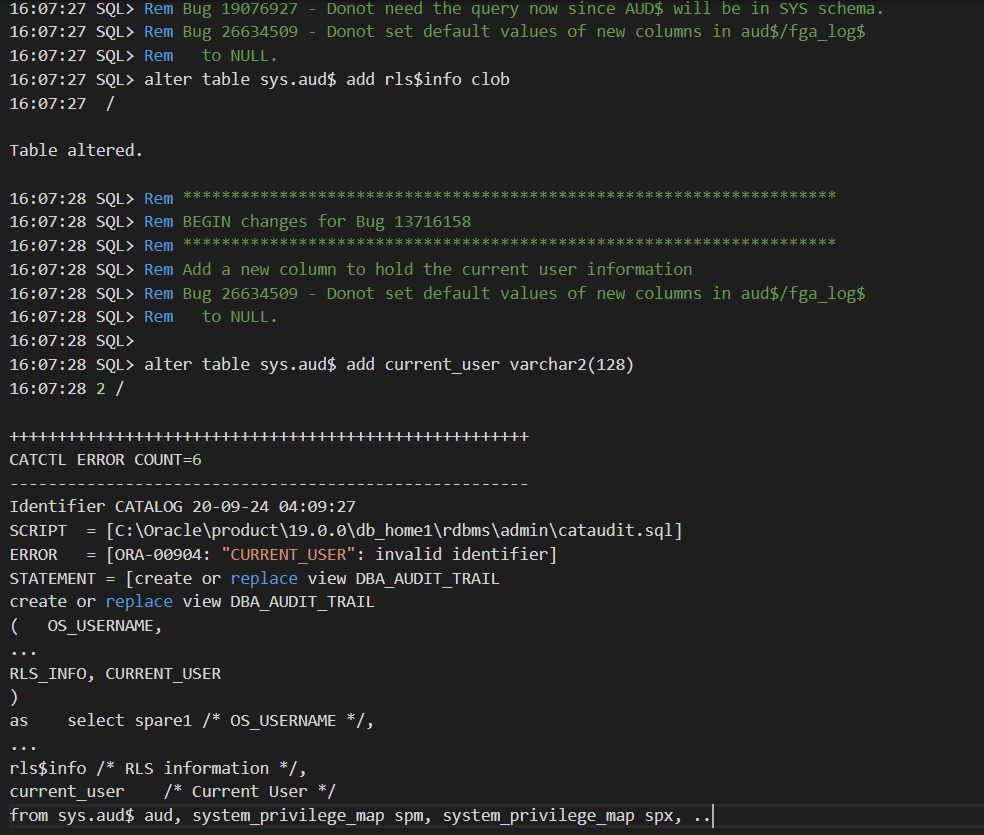
How can this be? adding columns to a table just to see them vanish few minutes later with no other ddl run on that table !
>> Fast forward 2 months and 7 MOS engineers later << (yes.. it hurts)

Explanation
The AUD$ table was actually under ADM schema and not SYS (sys.aud$ was just a synonym). But why on earth adding columns on sys.aud$ synonym didn’t raise any error (i.e ORA-00942). If we can’t run a ddl through a synonym, then an exception should be expected.
SQL> select owner, object_name, object_type from dba_objects where object_name='AUD$';
OWNER OBJECT_NAME  OBJECT_TYPE
---- ------------- ------------
SYS   AUD$         SYNONYM
ADM   AUD$         TABLE
ADM (SYSADM): Is what we call in Peoplesoft the administrative schema(Owner ID) which contains nearly all of the database objects and is used by PeopleSoft application to control schema objects access.
Solution
The fix that took 2 months to figure out was to add the columns directly to ADM.aud$ table before the autoupgrade
SQL> alter table adm.aud$ add rls$info clob;
SQL> alter table adm.aud$ add current_user varchar2(128);
2. CATJAVA
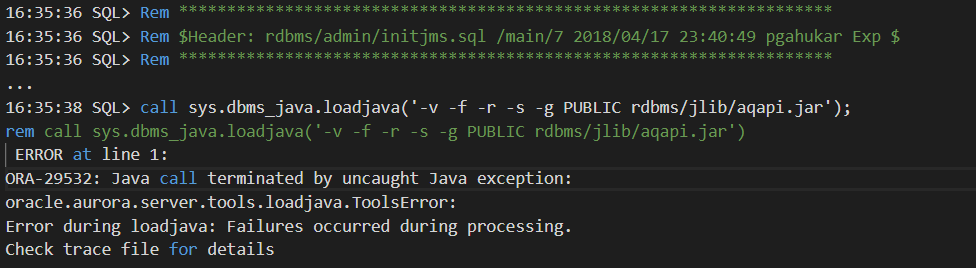
This issue was solved very early in the SR as the error is likely due to the missing XDK component which JAVA depends on. Note that source production database(12c) didn’t have XDK and java wasn’t used neither.
Solution
Install Oracle XDK and recompile invalid objects before the Autoupgrade as shown below
SQL> @?\xdk\admin\initxml.sql
SQL> @?\admin\utlrp.sql
3. DBMS_REGISTRY.TIMESTAMP not found
TIME_STAMP function had moved to dbms_registry_sys package sometime back and the internal cdend.sql script is still referring the old statement package. Even if it is only a failed select statement it will still block the upgrade.

Solution
Replace the called function with the right package in the 19c catalog script (?\admin\cdend.sql) and resume the autoupgrade
-- Replace the below line
SELECT dbms_registry.time_stamp('CATALOG') AS timestamp FROM DUAL;
-- By this one
SELECT dbms_registry_sys.time_stamp('CATALOG') AS timestamp FROM DUAL;
Important : Don’t hesitate to run the utlrp.sql after making changes before starting/resuming the Autoupgrade as you can always have invalid objects lingering that can block the upgrade (see below )
REASON: ORA-04063: package body "SYS.DBMS_REGISTRY_SYS" has errors
CONCLUSION
I wanted to share my experience so peers in the same situation won’t have to struggle with the support for months to get their databases upgraded in windows using a tool that is supposed to be an industry standard. Make no mistake, I love that I can leverage native automation for my DBA tasks but I just don’t call something AUTO when you have to add manual corrections to resolve undocumented bugs just because it’s windows. Being a beta tester is never fun but we can agree that Autoupgrade has room for improvement.
At last, it always feels good to see a successful output after too many failures

Thanks for reading

