Showing posts with label ZDM. Show all posts

Wednesday, December 21, 2022

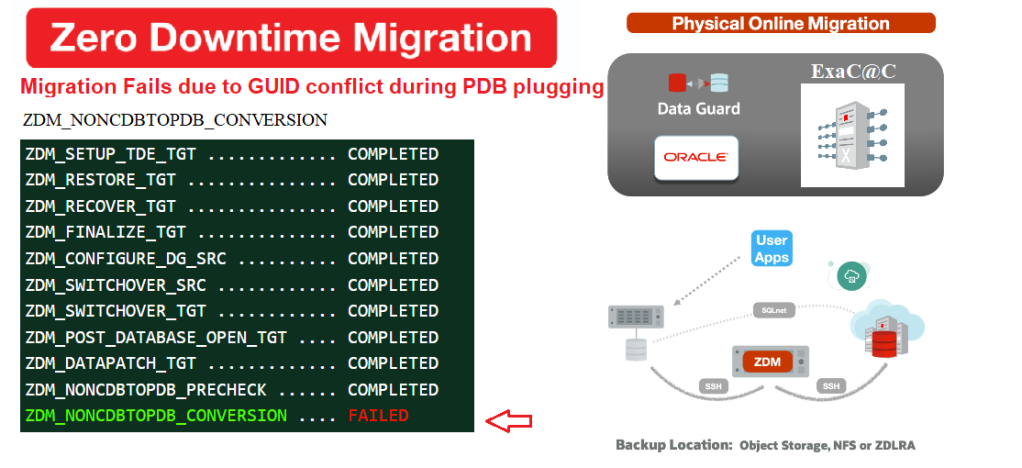
ZDM troubleshooting part 4: NONCDBTOPDB_CONVERSION fails (GUID conflicts with existing PDB)

This image has an empty alt attribute; its file name is image-3.png
Intro

Every time I think I’m done with my ZDM troubleshooting series, a new topic pops up :). I have also learned that every migration is distinct and brings its own unique challenges, so I have decided to keep the series open-ended. In this post, we will discuss the steps you should take when a conversion of a non-CDB to a PDB fails during a ZDM migration to identify the root cause, and get your migration back on track. So, let's dive in!

Note: you ca always explore the other ZDM troubleshooting related post below:
- Migration failing at ZDM_CONFIGURE_DG_SRC
- Migration failing at ZDM_SWITCHOVER_SRC plus hack 

My ZDM environment

  • ZDM: 21.3 build

Property                                                  Source                                              Target                                      
RAC NOYES
Encrypted NO YES
CDB NO YES
Release 12.212.2
PlatformOn prem LinuxExaCC


Prerequisites

All the prerequisites related to the ZDM VM, the Source and Target Database system were satisfied before running the migration.

Responsefile

Prepare a responsefile for a Physical Online Migration with the required parameters (see excerpt). I will just point out that ZDM 21.3 now supports Data Guard Broker configuration .

$ cat physical_online_demo.rsp | grep -v ^#
TGT_DB_UNIQUE_NAME=TGTCDB
MIGRATION_METHOD=ONLINE_PHYSICAL
DATA_TRANSFER_MEDIUM=DIRECT
PLATFORM_TYPE=EXACC
...etc


Run migration until the DG config –step1

As usual Irun the migrate command with the -pauseafter ZDM_CONFIGURE_DG_SRC to stop when the replication is configured in order to resume the full migration a later time. 

$ZDM_HOME/bin/zdmcli migrate database –sourcedb SRCDB \ -sourcenode srcHost -srcauth zdmauth \ -srcarg1 user:zdmuser \ -targetnode tgtNode \ -tgtauth zdmauth \ -tgtarg1 user:opc \ -rsp ./physical_online_demo.rsp –ignore ALL -pauseafter ZDM_CONFIGURE_DG_SRC

Resume migration  –step2

Now that the Data guard Configuration is complete. It’s time to resume the full migration to the end. 

$ zdmservice resume job –jobid 1

Querying job status

As you can see, It didn’t take long before noticing that the Switchover step failed. 

$ zdmservice query job –jobid 1
zdmhost.domain.com: Audit ID: 39
Job ID: 1
User: zdmuser
Client: zdmhost
Job Type: "MIGRATE"
Current status: FAILED
Result file path: "/u01/app/oracle/zdmbase/chkbase/scheduled/job-1-*log" ...
Job execution elapsed time: 1 hours 25 minutes 41 seconds
ZDM_GET_SRC_INFO .............. COMPLETED
ZDM_GET_TGT_INFO .............. COMPLETED
ZDM_PRECHECKS_SRC ............. COMPLETED
ZDM_PRECHECKS_TGT ............. COMPLETED
ZDM_SETUP_SRC ................. COMPLETED
ZDM_SETUP_TGT ................. COMPLETED
ZDM_PREUSERACTIONS ............ COMPLETED
ZDM_PREUSERACTIONS_TGT ........ COMPLETED
ZDM_VALIDATE_SRC .............. COMPLETED
ZDM_VALIDATE_TGT .............. COMPLETED
ZDM_DISCOVER_SRC .............. COMPLETED
ZDM_COPYFILES ................. COMPLETED
ZDM_PREPARE_TGT ............... COMPLETED
ZDM_SETUP_TDE_TGT ............. COMPLETED
ZDM_RESTORE_TGT ............... COMPLETED
ZDM_RECOVER_TGT ............... COMPLETED
ZDM_FINALIZE_TGT .............. COMPLETED
ZDM_CONFIGURE_DG_SRC .......... COMPLETED
ZDM_SWITCHOVER_SRC ............ COMPLETED
ZDM_SWITCHOVER_TGT ............ COMPLETED
ZDM_POST_DATABASE_OPEN_TGT .... COMPLETED
ZDM_DATAPATCH_TGT ............. COMPLETED
ZDM_NONCDBTOPDB_PRECHECK ...... COMPLETED
ZDM_NONCDBTOPDB_CONVERSION .... FAILED
ZDM_POST_MIGRATE_TGT .......... PENDING
ZDM_POSTUSERACTIONS ........... PENDING
ZDM_POSTUSERACTIONS_TGT ....... PENDING
ZDM_CLEANUP_SRC ............... PENDING
ZDM_CLEANUP_TGT ............... PENDING


Troubleshooting the error

To determine the content of the error message, the best approach is to check the $ZDM_BASE logs hosted locally on the target node “$ORACLE_BASE/zdm/zdm_targetDB_$jobID/zdm/log

-- Target node
$ cd $ORACLE_BASE/zdm/zdm_TGTCDB_1/zdm/log

$ tail ./zdm_noncdbtopdb_conversion_*.log
[jobid-1][2022-12-14][mZDM_Queries.pm:556]:[DEBUG] Output is :
SQL*Plus: Release 12.2.0.1.0 Production on Wed Dec 14 2022 ..
Connected to: Oracle Database 12c EE Extreme Perf Release 12.2.0.1.0 - 64bit Production
CREATE PLUGGABLE DATABASE zdm_aux_SRCDB using '/tmp/zdm_aux_SRCDB.xml' NOCOPY
TEMPFILE REUSE

 *  ERROR at line 1:

 ORA-65122: Pluggable database GUID conflicts with the GUID of an existing  container.

[jobid-1][2022-12-14][mZDM_convert_noncdb2pdb.pl:522]:[ERROR
failed to create the PDB 'zdm_aux_SRCDB'

As you can see above, the issue is related to the new PDB created in the target CDB from the auxiliary database


What Happened


In an online physical migration from a non-CDB database to a PDB on a target container, ZDM creates an auxiliary standby database in the background to ensure replication consistency before the final switchover. After the switchover is complete, a data patch is applied and an unplug and plug operation is done to convert the auxiliary DB into a PDB on the target container database (CDB).


Why is ZDM failing to create the new PDB?


Turns out, ZDM attempted to construct a new PDB from the generated XML manifest but was unsuccessful, as Oracle had assigned a default GUID from another PDB in the CDB. I wouldn't say this happens for all instances of target CDBs with existing PDBs (I already completed such migrations in the past), but in this case, two databases had already been migrated to the same target CDB before this one.

Subsidiary question
Why  did the CREATE PLUGGABLE DATABASE command use an existing GUID instead of generating a new one?
I don’t have the answer to this yet but we chose to open an SR and see if there was a workaround for this issue.


SOLUTION: ZDM pl script rewrite

 
Force ZDM to use the clone option :

  • ZDM uses a PDB plugin script called mZDM_convert_noncdb2pdb.pl to perform the PDB conversion

  • All we need to do is to update the script at the plugin section and add AS CLONE  to the create pluggable database command

Location : Make a copy of the below file on he ZDM host before the change

    cp $ZDM_HOME/rhp/zdm/mZDM_convert_noncdb2pdb.pl mZDM_convert_noncdb2pdb.pl.old

    The perl script contains variables replacing the PDB name & XML manifest, but the error here occurred because the script had a "NOCOPY" statement without an "AS CLONE" clause.   
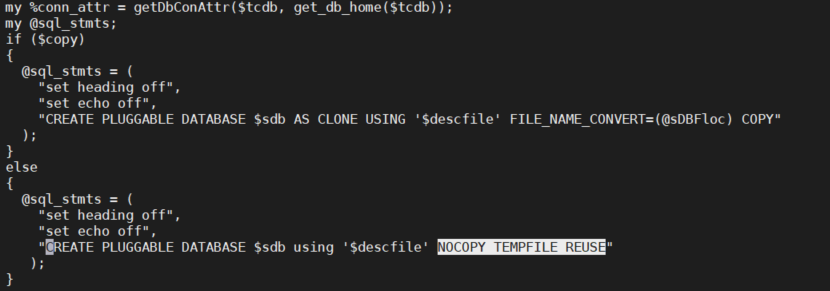
    This image has an empty alt attribute; its file name is image-2.pngTo fix the issue, we just need amend it and add the missing clone part.

      …else
      {
      @slq_stmts =(
      ...

      CREATE PLUGGABLE DATABASE $sdb AS CLONE USING '$descfile' NOCOPY TEMPFILE REUSE);
      }


      Note:

      • It is only advised to perform the below change in this particular case or when asked by Oracle support.


      Resume the job

      this is it, ZDM will now create the PDB as clone implying a new GUID after resuming the job to complete the rest of our online physical migration 

      $ zdmservice resume job –jobid 1
      $ zdmservice query job –jobid 1
      ...
      ZDM_CONFIGURE_DG_SRC .......... COMPLETED
      ZDM_SWITCHOVER_SRC ............ COMPLETED
      ZDM_SWITCHOVER_TGT ............ COMPLETED
      ZDM_POST_DATABASE_OPEN_TGT .... COMPLETED
      ZDM_DATAPATCH_TGT ............. COMPLETED
      ZDM_NONCDBTOPDB_PRECHECK ...... COMPLETED
      ZDM_NONCDBTOPDB_CONVERSION .... COMPLETED
      ZDM_POST_MIGRATE_TGT .......... PENDING
      ZDM_POSTUSERACTIONS ........... PENDING
      ZDM_POSTUSERACTIONS_TGT ....... PENDING
      ZDM_CLEANUP_SRC ............... PENDING
      ZDM_CLEANUP_TGT ............... PENDING


      Conclusion

      • We learned that ZDM may sometimes try to reuse an existing GUID while converting DB to PDB 
      • This may be fixed natively in future releases of ZDM.    
      • I can’t assume this behavior would be the same in all cases, because I already moved databases to a CDB with many PDBs without any problem in the past
      • Oracle documentation is explicit about the "AS CLONE" clause. Nevertheless, I don't think the same DB was migrated in the past to the same destination.
        Specifying AS CLONE also ensures that Oracle Database generates new identifiers(GUID,DBID) if the target CDB already contains a PDB that was created using the same set of data files
      • You might not run into the same error, but this is the quickest fix in case it happens. 

              Thank you for reading

      Monday, September 12, 2022

      ZDM troubleshooting part 3: Migration failing at ZDM_SWITCHOVER_SRC/ hack

      This image has an empty alt attribute; its file name is image-4.png
      Intro

      This is the last of my troubleshooting series related to ZDM where I have accidentally become an unofficial QA tester for ZDM :). After describing scenarios in previous posts where ZDM service was crashing or DG configuration was failing. I will, in this article, explain why my broker switchover step failed the online physical migration and share a sneaky hack to skip a ZDM task during a zdmcli resume, after fixing it manually  
      (user discretion is advised).  

      My ZDM environment

      • ZDM: 21.3 build

      Property                                                  Source                                              Target                                      
      RAC NOYES
      Encrypted NO YES
      CDB NO YES
      Release 12.212.2
      PlatformOn prem LinuxExaCC


      Prerequisites

      All the prerequisites related to the ZDM VM, the Source and Target Database system were satisfied before running the migration.

      Responsefile

      Prepare a responsefile for a Physical Online Migration with the required parameters (see excerpt). I will just point out that ZDM 21.3 now supports Data Guard Broker configuration .

      $ cat physical_online_demo.rsp | grep -v ^#
      TGT_DB_UNIQUE_NAME=TGTCDB
      MIGRATION_METHOD=ONLINE_PHYSICAL
      DATA_TRANSFER_MEDIUM=DIRECT
      PLATFORM_TYPE=EXACC
      ZDM_USE_DG_BROKER=TRUE
      ...etc


      Run migration until the DG config –step1

      It is very common to run the migrate command with the -pauseafter ZDM_CONFIGURE_DG_SRC to stop when the replication is configured in order to resume the full migration a later time. 

      $ZDM_HOME/bin/zdmcli migrate database –sourcedb SRCDB \ -sourcenode srcHost -srcauth zdmauth \ -srcarg1 user:zdmuser \ -targetnode tgtNode \ -tgtauth zdmauth \ -tgtarg1 user:opc \ -rsp ./physical_online_demo.rsp –ignore ALL -pauseafter ZDM_CONFIGURE_DG_SRC

      Resume migration  –step2

      Now that the Data guard Configuration is complete. It’s time to resume the full migration to the end. 

      $ zdmservice resume job –jobid 2

      Querying job status

      As you can see, It didn’t take long before noticing that the Switchover step failed. 

      $ zdmservice query job –jobid 2
      zdmhost.domain.com: Audit ID: 39
      Job ID: 2
      User: zdmuser
      Client: zdmhost
      Job Type: "MIGRATE"
      Current status: FAILED
      Result file path: "/u01/app/oracle/zdmbase/chkbase/scheduled/job-2-*log" ...
      Job execution elapsed time: 1 hours 25 minutes 41 seconds
      ZDM_GET_SRC_INFO .............. COMPLETED
      ZDM_GET_TGT_INFO .............. COMPLETED
      ZDM_PRECHECKS_SRC ............. COMPLETED
      ZDM_PRECHECKS_TGT ............. COMPLETED
      ZDM_SETUP_SRC ................. COMPLETED
      ZDM_SETUP_TGT ................. COMPLETED
      ZDM_PREUSERACTIONS ............ COMPLETED
      ZDM_PREUSERACTIONS_TGT ........ COMPLETED
      ZDM_VALIDATE_SRC .............. COMPLETED
      ZDM_VALIDATE_TGT .............. COMPLETED
      ZDM_DISCOVER_SRC .............. COMPLETED
      ZDM_COPYFILES ................. COMPLETED
      ZDM_PREPARE_TGT ............... COMPLETED
      ZDM_SETUP_TDE_TGT ............. COMPLETED
      ZDM_RESTORE_TGT ............... COMPLETED
      ZDM_RECOVER_TGT ............... COMPLETED
      ZDM_FINALIZE_TGT .............. COMPLETED
      ZDM_CONFIGURE_DG_SRC .......... COMPLETED
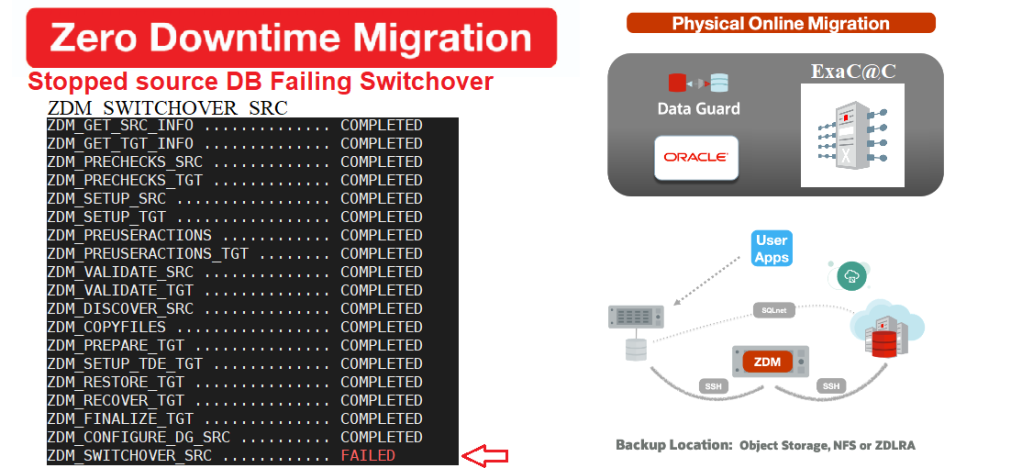
      ZDM_SWITCHOVER_SRC ............ FAILED
      ZDM_SWITCHOVER_TGT ............ PENDING
      ZDM_POST_DATABASE_OPEN_TGT .... PENDING
      ZDM_DATAPATCH_TGT ............. PENDING
      ZDM_NONCDBTOPDB_PRECHECK ...... PENDING
      ZDM_NONCDBTOPDB_CONVERSION .... PENDING
      ZDM_POST_MIGRATE_TGT .......... PENDING
      ZDM_POSTUSERACTIONS ........... PENDING
      ZDM_POSTUSERACTIONS_TGT ....... PENDING
      ZDM_CLEANUP_SRC ............... PENDING
      ZDM_CLEANUP_TGT ............... PENDING


      Troubleshooting

      I usually like to dig into the specific $ZDM_BASE logs hosted locally in the src node, but the result file here is enough to investigate the failure as the log is pretty detailed. 

      $ tail /u01/app/oracle/zdmbase/chkbase/scheduled/job-2-*log

      Executing Oracle Data Guard Broker switchover to database "zdm_aux_SRCDB"
      on database "SRCDB" ... ####################################################################

      PRGZ-3605 : Oracle Data Guard Broker switchover to database "zdm_aux_SRCDB"
      on database "DB" failed.
      Unable to connect to database using (DESCRIPTION=(ADDRESS=(PROTOCOL=TCP)
      (HOST=srcnode)(PORT=1531)) …

      Please complete the following steps to finish switchover:
      start up and mount instance "SRCDB" of database "SRCDB"

      To be honest I am half surprised, since we used the DG Broker here and it’s known to be unstable at times during switchovers (had many failed switchovers due to tight connection timeouts on the old primary on ExaCC).


      What Happened

      The switchover actually completed but the source database didn’t restart after the role conversion. At least the suggested action is self explanatory and we don’t have to dig more to proceed with the rest of the migration. 


      Restart the new standby 

        SQL> startup mount;


        Resume the job after restarting the new standby(src) ?

        After confirming that the old primary (now standby) has restarted in mount mode, we can resume our job.

          $ zdmservice resume job –jobid 2

          Unfortunately, the job fails again at the same phase as before.

            $ zdmservice query job –jobid 2
            Type: "MIGRATE"
            Current status: FAILED

            ZDM_SWITCHOVER_SRC ............ FAILED


            Why is ZDM failing after the Resume ?


            It turns out ZDM was trying to restart the switchover again even if it was already done. This stopped the migration right there since the source Database role wasn’t Primary. But how do we
            skip a step in ZDM upon resume??

              --- On the source
              $ cd $ORACLE_BASE/zdm/zdm_SRCDB_$jobID/zdm/log

              $ tail -f ./zdm_is_switchover_ready_src_29038.log
              [mZDM_Queries.pm:564]:[DEBUG] Output is:qtag:PHYSICAL STANDBY:qtag: [mZDM_helper:240]:[ERROR] Database 'SRCDB' is not a PRIMARY database.


              Solution: ZDM hack


              ---------------------------------------------DISCLAIMER----------------------------------------------------

              • Although the option to skip a migration step might be available in future releases of ZDM.

              • You should not perform the following on production unless explicitly advised by Oracle support.


              Undocumented hack:

              • ZDM uses a checkpoint file to synchronize the status of each step between all members of the migration

              • It’s a simple xml file that is updated each time a phase state is changed. This file is also checked by ZDM anytime a resume command is called.   

                $ZDM_BASE/chkbase/GHcheckpoints/<source host>+<source db>+<target host>/

                Example : cd $ZDM_BASE/chkbase/GHcheckpoints/srcNode+SRCDB+targetNode/
                $ vi srcNode+SRCDB+targetNode.xml

                <CHECKPOINT LEVEL="MAJOR" NAME="ZDM_SWITCHOVER_SRC" DESC="ZDM_SWITCHOVER_SRC"
                STATE="START"/> ---> REPLACE STATE AS FOLLOWS <CHECKPOINT LEVEL="MAJOR" NAME="ZDM_SWITCHOVER_SRC" DESC="ZDM_SWITCHOVER_SRC"
                STATE="SUCCESS"/>


                Resume the job

                Voila, ZDM will now skip the switchover after resuming the job to complete the rest of our online physical migration 

                $ zdmservice resume job –jobid 2
                $ zdmservice query job –jobid 2
                ...
                ZDM_CONFIGURE_DG_SRC .......... COMPLETED
                ZDM_SWITCHOVER_SRC ............ COMPLETED
                ZDM_SWITCHOVER_TGT ............ PENDING
                ZDM_POST_DATABASE_OPEN_TGT .... PENDING
                ZDM_DATAPATCH_TGT ............. PENDING
                ZDM_NONCDBTOPDB_PRECHECK ...... PENDING
                ZDM_NONCDBTOPDB_CONVERSION .... PENDING
                ZDM_POST_MIGRATE_TGT .......... PENDING
                ZDM_POSTUSERACTIONS ........... PENDING
                ZDM_POSTUSERACTIONS_TGT ....... PENDING
                ZDM_CLEANUP_SRC ............... PENDING
                ZDM_CLEANUP_TGT ............... PENDING


                Conclusion

                • In this scenario, we tricked ZDM into skipping the switchover stage as it was already done
                • Big thanks to ZDM team for being very responsive on my migration qualms as always   
                • This is an interesting scenario because ZDM usually has only a rerun feature but not a skip option
                • Also, I didn’t have this problem when DG_BROKER wasn’t enabled in another ZDM migration 
                • Like l said I’ve been told the introduction of such feature is most likely in the future, so stay tuned
                • Hope this will help anyone who runs into the same error to quickly fix it and go on with the migration

                        Thank you for reading

                Monday, September 5, 2022

                ZDM troubleshooting part 2: Migration failing at ZDM_CONFIGURE_DG_SRC

                This image has an empty alt attribute; its file name is image-3.png


                Intro

                I didn’t anticipate to have a series of posts around ZDM, but I had few issues that were worth sharing so here I am. This post will describe what caused a failure of an online physical migration ExaCC right at the Data guard configuration phase. The good thing about ZDM, is as soon as any detected issue is fixed manually, the resume job action will get you going which is the perfect design for a migration solution.


                1. My ZDM environment

                • ZDM: 21.3 build

                Property                                                  Source                                              Target                                      
                RAC NO YES
                Encrypted NO YES
                CDB NO YES
                Release 12.212.2
                PlatformOn prem LinuxExaCC


                Prerequisites

                All the prerequisites related to the ZDM VM, the Source and Target Database system were satisfied before running the migration

                Responsefile

                Prepare a responsefile for a Physical Online Migration with the required parameters.The parameters themselves are not important in our case. I will just point out that ZDM 21.3 now supports Data Guard Broker configuration

                $ cat physical_online_demo.rsp | grep -v ^#
                TGT_DB_UNIQUE_NAME=TGTCDB
                MIGRATION_METHOD=ONLINE_PHYSICAL
                DATA_TRANSFER_MEDIUM=DIRECT
                PLATFORM_TYPE=EXACC
                ZDM_USE_DG_BROKER=TRUE
                ...


                Run ZDMCLI Eval command

                • The eval command successfully ran all prechecks to ensure migration readiness, so we’re good to go

                $ZDM_HOME/bin/zdmcli migrate database –sourcedb SRCDB \ -sourcenode srcHost -srcauth zdmauth \ -srcarg1 user:zdmuser \ -targetnode tgtNode \ -tgtauth zdmauth \ -tgtarg1 user:opc \ -rsp ./physical_online_demo.rsp –eval


                Run migration until the DG config

                Now, It’s time to run the migrate command with the -pauseafter ZDM_CONFIGURE_DG_SRC because the goal is to stop when the replication is configured in order to resume the full migration a later time. 

                $ZDM_HOME/bin/zdmcli migrate database –sourcedb SRCDB \ -sourcenode srcHost -srcauth zdmauth \ -srcarg1 user:zdmuser \ -targetnode tgtNode \ -tgtauth zdmauth \ -tgtarg1 user:opc \ -rsp ./physical_online_demo.rsp –ignore ALL -pauseafter ZDM_CONFIGURE_DG_SRC

                Querying job status

                As you can see even if the standby was prepared successfully the Data guard configuration failed. 

                $ zdmservice query job –jobid 2
                zdmhost.domain.com: Audit ID: 39
                Job ID: 2
                User: zdmuser
                Client: zdmhost
                Job Type: "MIGRATE"
                Current status: FAILED
                Result file path: "/u01/app/oracle/zdmbase/chkbase/scheduled/job-2-*log" ...
                Job execution elapsed time: 1 hours 25 minutes 41 seconds
                ZDM_GET_SRC_INFO .............. COMPLETED
                ZDM_GET_TGT_INFO .............. COMPLETED
                ZDM_PRECHECKS_SRC ............. COMPLETED
                ZDM_PRECHECKS_TGT ............. COMPLETED
                ZDM_SETUP_SRC ................. COMPLETED
                ZDM_SETUP_TGT ................. COMPLETED
                ZDM_PREUSERACTIONS ............ COMPLETED
                ZDM_PREUSERACTIONS_TGT ........ COMPLETED
                ZDM_VALIDATE_SRC .............. COMPLETED
                ZDM_VALIDATE_TGT .............. COMPLETED
                ZDM_DISCOVER_SRC .............. COMPLETED
                ZDM_COPYFILES ................. COMPLETED
                ZDM_PREPARE_TGT ............... COMPLETED
                ZDM_SETUP_TDE_TGT ............. COMPLETED
                ZDM_RESTORE_TGT ............... COMPLETED
                ZDM_RECOVER_TGT ............... COMPLETED
                ZDM_FINALIZE_TGT .............. COMPLETED
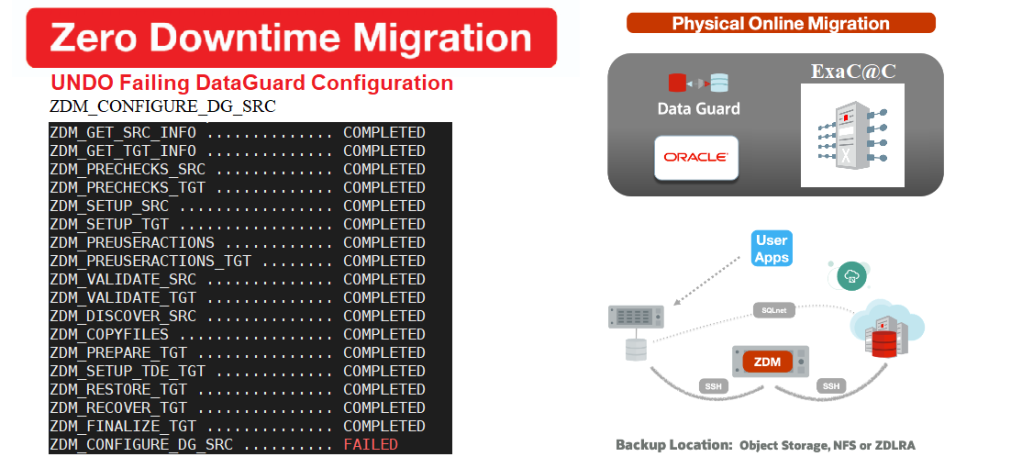
                ZDM_CONFIGURE_DG_SRC .......... FAILED
                ZDM_SWITCHOVER_SRC ............ PENDING
                ZDM_SWITCHOVER_TGT ............ PENDING
                ZDM_POST_DATABASE_OPEN_TGT .... PENDING
                ZDM_DATAPATCH_TGT ............. PENDING
                ZDM_NONCDBTOPDB_PRECHECK ...... PENDING
                ZDM_NONCDBTOPDB_CONVERSION .... PENDING
                ZDM_POST_MIGRATE_TGT .......... PENDING
                ZDM_POSTUSERACTIONS ........... PENDING
                ZDM_POSTUSERACTIONS_TGT ....... PENDING
                ZDM_CLEANUP_SRC ............... PENDING
                ZDM_CLEANUP_TGT ............... PENDING


                Troubleshooting

                We can check the result file to investigate the error, but I always like to dig into the specific ZDM_BASE logs hosted locally in specific src/target nodes. Here it’s in the source server (see below)

                --- On the source
                $ cd $ORACLE_BASE/zdm/zdm_SRCDB_$jobID/zdm/log
                $ tail -f ./zdm_configure_dg_src_5334.log
                [mZDM_Queries.pm:6136]:[DEBUG] None of DB_CREATE_FILE_DEST,
                DB_CREATE_ONLINE_LOG_DEST_%,DB_RECOVERY_FILE_DEST is configured for SRCDB

                [mZDM_Queries.pm:*]:[DEBUG] Will be running following sql as user: oracle:
                [mZDM_Queries.pm:3377]:[ERROR] unable to created undo tablespace UNDOTBS2
                CREATE UNDO TABLESPACE UNDOTBS2 DATAFILE '/oradata/undotbs2.dbf' SIZE 98300M
                AUTOEXTEND ON

                *
                ERROR at line 1: ORA-01144: File size (12582400 blocks)
                exceeds maximum of 4194303 blocks

                Looks like ZDM wanted to create a large second UNDO tablespace in the source, with one Data file that’s greater than 32GB. But why does ZDM need to create a second undo tablespaces in source DB.


                Why is a second UNDO needed ?

                In the 21.3 release Note, you’ll find that:
                `ZDM adds UNDO tablespaces to the production database to match target instance count
                , if source database has fewer instances` 

                • Hence, an ExaCC 2 node RAC will require ZDM to create a 2nd UNDO tablespaces in the source     


                What really Happened


                Ok so far it makes sense, but what really caused our failure is that ZDM tried to create a 2nd UNDO with a datafile of 98GB. Let’s check our source UNDO tablespace to learn more.

                  SRCDB> @check_tbs UNDO

                  TABLESPACE_NAME  ALLOCATED_MB MAX_SIZE_MB  FREE_PCT ---------------- ------------ ------------ ----------
                  UNDO              98301         97681         99
                    

                  FILE_NAME               Size ---------------------- ------ /oradata/undo_1.dbf     32GB /oradata/undo_2.dbf     32GB /oradata/undo_3.dbf     32GB

                  Root cause:
                  It turns out ZDM was trying to create a second UNDO tablespace based on the total size of the tablespace using one datafile which would have not triggered an error if the total tablespace size was lower than 32GB. 


                  Solution: Recreate as Bigfile


                  Although an ER has already been filed by Oracle support after I told them about it, I still needed a quick fix.
                  So here’s what I did: (On Source DB)

                  • Create a new dummy UNDO tablespaces (Ideally same size as the original UNDO)

                      SQL> CREATE UNDO TABLESPACE UNDOTBS3 DATAFILE '/oradata/undotbs3.dbf' SIZE 10G; SQL> ALTER SYSTEM SET UNDO_TABLESPACE = UNDOTBS3 SCOPE=BOTH;
                      SQL> SELECT tablespace_name, status, count(*) from dba_rollback_segs
                      group by tablespace_name, status;
                      TABLESPACE_NAME                STATUS         COUNT(*) ------------------------------ ------------ ---------- UNDOTBS3                       ONLINE               10 UNDO                           OFFLINE              24 <--- ready to be dropped

                    1. When the old Undo tablespace is of status OFFLINE, drop it

                        SQL> DROP TABLESPACE UNDO including contents and datafiles;

                      1. Now recreate the old UNDO using one Bigfile datafile   

                          CREATE BIGFILE UNDO TABLESPACE UNDO DATAFILE '/oradata/undotbs.dbf' SIZE 90G;
                          ALTER SYSTEM SET UNDO_TABLESPACE = UNDO SCOPE=BOTH;

                        1. Drop the dummy UNDO tablespace

                            SQL> DROP TABLESPACE UNDOTBS3 including contents and datafiles;

                            Note: I have not named it UNDOTBS2 because ZDM will use it when creating the second UNDO later. 


                          Resume the job

                          Now that we have one bigfile in the UNDO tablespace we can resume the ZDM job and the phase will not complain

                          $ zdmservice resume job –jobid 2
                          $ zdmservice query job –jobid 2
                          ...
                          ZDM_CONFIGURE_DG_SRC .......... COMPLETED
                          ZDM_SWITCHOVER_SRC ............ PENDING
                          ZDM_SWITCHOVER_TGT ............ PENDING
                          ZDM_POST_DATABASE_OPEN_TGT .... PENDING
                          ZDM_DATAPATCH_TGT ............. PENDING
                          ZDM_NONCDBTOPDB_PRECHECK ...... PENDING
                          ZDM_NONCDBTOPDB_CONVERSION .... PENDING
                          ZDM_POST_MIGRATE_TGT .......... PENDING
                          ZDM_POSTUSERACTIONS ........... PENDING
                          ZDM_POSTUSERACTIONS_TGT ....... PENDING
                          ZDM_CLEANUP_SRC ............... PENDING
                          ZDM_CLEANUP_TGT ............... PENDING

                          Pause After Phase: "ZDM_CONFIGURE_DG_SRC"

                          Tip:

                                 Best way to avoid this issue is to convert the source UNDO into Big file in the first place .


                          Conclusion

                          • Although ZDM allows you to run one command to automate the entire migration you still need to troubleshoot issue that might occur here and there  
                          • The automation with a resume option in case failure makes the process more reassuring to us DBAs
                          • Hope this will help anyone who runs into the same error to quickly fix it and go on with the migration
                          • On my next post I’ll be talking about another issue I faced which required a little hack, stay tuned

                                  Thank you for reading

                          Sunday, September 4, 2022

                          ZDM troubleshooting part 1: VM causes ZDM service to crash (plus fix)

                          This image has an empty alt attribute; its file name is image-2.png

                          Intro

                          Zero downtime migration (ZDM) is the ultimate solution to migrate your Oracle database to Oracle Cloud. I recently started using it quite a lot during  On-Prem to Exadata at Customer migrations. In my last blog post, I already shared tips about a ZDM installation error related to MySQL. This time, I’ll describe why my environment was crashing the zdm service every time an eval command was run and provide the fix. This is not a bug but just an unexpected behaviour due to a not so clean VM host.


                          Acknowledgement

                          I’d like to thank ZDM dev team that chimed in to tackle this tough one after I opened an SR. It was never heard of, which is why I decided to write about it .


                          1. My ZDM environment


                          VM

                          ZDM: 21.3 build

                          OS: Oracle Linux 8.4 kernel 5.4.17-2102.201.3.el8uek.x86_64


                          Prerequisites

                          After the installation , I just made sure that the connectivity was all set between: 
                          ZDM-Source/Target system (ssh/SQLNET)


                          Steps to Reproduce the error

                          Prepare a responsefile for a Physical online migration with the required parameters to reproduce the behaviour.
                          The parameters themselves are not important in our case
                          Responsefile

                          $ cat physical_online_demo.rsp | grep -v ^#
                          TGT_DB_UNIQUE_NAME=TGTCDB
                          MIGRATION_METHOD=ONLINE_PHYSICAL
                          DATA_TRANSFER_MEDIUM=DIRECT
                          PLATFORM_TYPE=EXACC
                          ..More

                          ZDM service started:

                          $ zdmservice status
                          ---------------------------------------
                          Service Status
                          ---------------------------------------
                          Running: true
                          Tranferport:
                          Conn String: jdbc:mysql://localhost:8897/
                          RMI port: 8895
                          HTTP port: 8896
                          Wallet path: /u01/app/oracle/zdmbase/crsdata/velzdm2prm/security


                          Run ZDMCLI listphases

                          • So far so good, no error thrown because there is nothing processed really in terms of checks

                          $ZDM_HOME/bin/zdmcli migrate database –sourcedb SRCDB \ -sourcenode srcHost -srcauth zdmauth \ -srcarg1 user:zdmuser \ -targetnode tgtNode \ -tgtauth zdmauth \ -tgtarg1 user:opc \ -rsp ./physical_online_demo.rsp -listphases
                          zdmhostname: 2022-08-30T19:15:00.499Z : Processing response file ...
                          pause and resume capable phases for this operation: "
                          ZDM_GET_SRC_INFO
                          ZDM_GET_TGT_INFO
                          ZDM_PRECHECKS_SRC
                          ZDM_PRECHECKS_TGT
                          ZDM_SETUP_SRC
                          ZDM_SETUP_TGT
                          ZDM_PREUSERACTIONS
                          ZDM_PREUSERACTIONS_TGT
                          ZDM_VALIDATE_SRC
                          ZDM_VALIDATE_TGT
                          ZDM_DISCOVER_SRC
                          ZDM_COPYFILES
                          ZDM_PREPARE_TGT
                          ZDM_SETUP_TDE_TGT
                          ZDM_RESTORE_TGT
                          ZDM_RECOVER_TGT
                          ZDM_FINALIZE_TGT
                          ZDM_CONFIGURE_DG_SRC
                          ZDM_SWITCHOVER_SRC
                          ZDM_SWITCHOVER_TGT
                          ZDM_POST_DATABASE_OPEN_TGT
                          ZDM_DATAPATCH_TGT
                          ZDM_NONCDBTOPDB_PRECHECK
                          ZDM_NONCDBTOPDB_CONVERSION
                          ZDM_POST_MIGRATE_TGT
                          ZDM_POSTUSERACTIONS
                          ZDM_POSTUSERACTIONS_TGT
                          ZDM_CLEANUP_SRC
                          ZDM_CLEANUP_TGT"

                          Run ZDMCLI Eval command

                          • The eval command will run critical prechecks that will validate the migration readiness and zdmcli service is more involved here. The job will first be scheduled before starting to execute the eval operation.

                          $ZDM_HOME/bin/zdmcli migrate database –sourcedb SRCDB \ -sourcenode srcHost -srcauth zdmauth \ -srcarg1 user:zdmuser \ -targetnode tgtNode \ -tgtauth zdmauth \ -tgtarg1 user:opc \ -rsp ./physical_online_demo.rsp –eval

                          Enter source database SRCDB SYS password:
                          zdmhostname: 2022-08-30T20:15:00.499Z : Processing response file ...
                          Operation "zdmcli migrate database" scheduled with the job ID "1".


                          ZDM service crashing

                          Error:
                          The eval command ends up crashing the service as soon as the execution kicks in.

                          Querying job status 

                          $ zdmcli query job -jobid 1
                          PRGT-1038: ZDM service is not running.
                          Failed to retrieve RMIServer stub: javax.naming.ServiceUnavailableException
                          [Root exception is java.rmi.ConnectException: Connection refused to host:zdmhost;
                          nested exception is:
                          java.net.ConnectException: Connection refused (Connection refused)]

                          ZDMService status: down

                          $ zdmservice status | grep Running
                          Running:   false


                          Troubleshooting

                          Trace the ZDM service  

                           Many things were tried to investigate where this behaviour came from amongst which tracing ZDM service

                          export SRVM_TRACE=TRUE
                          export GHCTL_TRACEFILE=$ZDMBASE/srvm.trc
                          $ZDMHOME/bin/zdmservice stop
                          $ZDMHOME/bin/zdmservice start
                          --> Re-Run the Eval Command

                          • No luck, every time the service restarted it would crash again before I had the time to run another eval .

                          Upgrade/reinstall ZDM  

                            I also tried an upgrade to the last build then a full reinstall but ZDM still crashed

                          $ /zdminstall.sh update oraclehome=$ZDM_HOME ziploc=./NewBuild/zdm_home.zip

                          The previous job being still in the queue when restarting the zdmservice, I didn’t need to run anything to crash ZDM


                          Logs to check in ZDM  

                          Anytime you open an SR due to ZDM issues, the common location to fetch logs is ZDM_BASE using below cmd

                          $ find . -iregex '.*\.\(log.*\|err\|out\|trc\)$' -exec tar -rvf out.tar {} \;


                          Root cause

                          This was hard to uncover considering the issue was never encountered in the past but if we look down the zdm log.

                          $ view $ZDM_BASE/crsdata/`hostname`/rhp/zdmserver.log.0
                          … [DEBUG] [HASContext.<init>:129] moduleInit = 7
                          [DEBUG] [SRVMContext.init:224] Performing SRVM Context init. Init Counter=1
                          [DEBUG] [Version.isPre:804] version to be checked 21.0.0.0.0 major version to
                          check against 10

                          [DEBUG] [Version.isPre:815]  isPre.java: Returning FALSE
                          [DEBUG] [OCR.loadLibrary:339] 17999  Inside constructor of OCR
                          [DEBUG] [SRVMContext.init:224] Performing SRVM Context init. Init Counter=2
                          [DEBUG] [OCR.isCluster:1061]  Calling OCRNative for isCluster()
                          [CRITICAL] [OCRNative.Native]  JNI: clsugetconf retValue = 5
                          [CRITICAL] [OCRNative.Native]  JNI: clsugetconf failed with error code = 5
                          [DEBUG] [OCR.isCluster:1065]  OCR Result status = false
                          [DEBUG] [Cluster.isCluster:xx] Failed to detect cluster: JNI: clsugetconf failed

                          We can see that some OCR checks were failing and a mismatch seem to have caused the failure but why?


                          What really happened ?

                          ZDM software (without delving into details) has bits of grid infrastructure core embedded within.

                          • There is a reason why the Doc asks to make sure ``Oracle Grid Infrastructure isn't running on the ZDM service host`` before the installation.

                          • Here we have a failing check of the GI software version (crsctl query has releaseversion) where expected value is 21c but result is different. This made zdm crash when the eval was executed.


                          Why?


                          The ZDM VM had an oratab and bunch of other ocr files under /etc/oracle that were used to perform the CRS version check(ocr.loc). Which in turn messed up with ZDM service as CRS couldn’t be detected.

                          This image has an empty alt attribute; its file name is image-1.png

                          The vm had leftovers from an old DB and grid environment that weren’t cleaned.

                            $ cat /etc/oracle/oratab
                            +ASM:/u01/app/19.0.0/grid:N
                            CDB1:/u01/app/oracle/product/19.0.0/dbhome_1:W


                            Solution: drop the files


                            We first moved the files out of /etc/oracle and the eval command worked without crashing the ZDM service.


                            Conclusion

                            • This took days to resolve, mainly because the provisioned VM was supposed to be a fresh image of Oracle Enterprise Linux 8, hence it never crossed my mind to check if grid configuration existed in it.
                            • It all goes to show why Oracle strongly recommends to have ZDM installed in a dedicated host with no previous grid installation
                            • Hope this will help anyone who runs into the same error and reminds users to double check their Environment .    

                                    Thank you for reading

                            Monday, July 18, 2022

                            ZDM installation error in Oracle Linux 8 (Failed to initialize MySQL) & how to fix it

                            This image has an empty alt attribute; its file name is image-9.png

                            Intro

                            Zero downtime migration (ZDM) is one of the best option available to migrate your Oracle database to Oracle Cloud. Automation and simplicity are among its strong benefits beside zero downtime feature. Although migrating in OCI is the classic use case(see Oracle migration & integration specialist certification), I had the chance to try a different scenario lately, where the path was On-Prem Linux to Oracle Exadata at Customer.

                            In this blog post, I’ll describe the blocking issue I had while installing ZDM io an On-prem VM, and provide the solution.


                            1. My ZDM environment


                            Discloser

                            Although, an SR was already opened for this issue and Oracle dev team seemed to make it work in a similar environment. I could still not get ZDM to be installed in my vm, hence this blog post to explain both the error causing MySQL initialization failure, and the workaround.


                            VM

                            OS Oracle Linux 8.4 kernel 5.4.17-2102.201.3.el8uek.x86_64

                            File system: /dev/mapper/vg01-lvol1 on /u01 type ext4 (rw,relatime,seclabel)

                            MySQL server 8.0.22

                            ZDM 21.3 build

                            [zdmuser@zdmserver ~]$ uname -a
                            Linux zdmserver 5.4.17-2102.201.3.el8uek.x86_64 [zdmuser@zdmserver ~]$ cat /etc/redhat-release

                            Red Hat Enterprise Linux release 8.4 (Ootpa)

                            Prerequisites

                            After downloading the ZDM installable Zip and extracting it, I have created necessary directories for the installation

                            export INVENTORY_LOCATION=/u01/app/oraInventory
                            export ORACLE_BASE=/u01/app/oracle
                            export ZDM_BASE=/u01/app/oracle/zdmbase ----> ZDM config files, logs
                            export ZDM_HOME=/u01/app/oracle/zdmbase/zdm21 ----> ZDM software binaries
                            export ZDM_INSTALL_LOC=/u01/zdm21-inst ----> ZDM installable

                            - Create directories

                            [zdmuser@zdmserver]$ mkdir -p $ORACLE_BASE $ZDM_BASE $ZDM_HOME $ZDM_INSTALL_LOC


                            Steps to Reproduce the error

                            All I had to do is to run the install script with the required arguments (directories) to reproduce the behaviour.

                            $ ./zdminstall.sh setup oraclehome=$ZDM_HOME oraclebase=$ZDM_BASE \
                            ziploc=./zdm_home.zip -zdm

                             
                            Failure to initialize MySQL

                            • The error as you can see happened at MySQL configuration stage and lacks any relevant description

                            Setting up MySQL...
                            ---------------------------------------
                            Failed to initialize MySQL
                            Failed to initialize MySQL
                            One or more errors occurred while setting up No GI RHP.
                            Trying to stop MySQL in case it was started and left up.
                            spawn /u01/app/oracle/zdm21/mysql/server/bin/mysqladmin --defaults-file=/u01/app/oracle/crsdata/velzdm2prm/rhp/conf/my.cnf -u root -p shutdown WARNING: Failed to stop MySQL

                            Now, at this point we can either, retry the installation forever, or start digging further.

                            Which log to check 

                            I had no clue really, but I decided to just hit find  under /u01 and try my luck with “mysql” as filter ;) .

                            JACKPOT! here is the winner

                            /u01/app/oracle/crsdata/zdmserver/rhp/mysql/metadata/mysql-error.log

                            You got it, always look under $ORACLE_BASE/crsdata/myserver/rhp/mysql/metadata for such log 

                            The actual error

                            Clearly, MySQL creation step failed because temporary files couldn't be created in an ext FS as show below.

                            $ more $ORACLE_BASE/zdmbase/crsdata/zdmserver/rhp/mysql/metadata/mysql-error.log
                            … 1 [System] [MY-013576] [InnoDB] InnoDB initialization has started. 1 [ERROR] [MY-012128] [InnoDB] posix_fallocate(): Failed to preallocate data
                            for file ./#innodb_temp/temp_1.ibt, desired size 81920 Operating system error
                            number 22. 1 [ERROR] [MY-012929] [InnoDB] InnoDB Database creation was aborted with error Out of disk space


                            What does it really mean ?


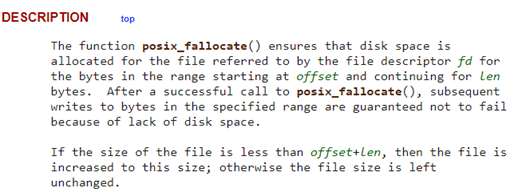
                            In MySQL8, innoDB files are created using a specific function (like
                            dd) called posix_fallocate, which just writes 000s in a disk file to reserve space. See description below

                            This image has an empty alt attribute; its file name is image.png

                            I obviously shared this in the SR, but I wanted to see what MySQL community had to say about it, so I looked it up.

                            MySQL Bug or ext dislike


                            It didn’t take long before I found the answer in stackoverflow . As explained below it seems that posix_fallocate function isn’t supported by ext file systems.

                            Image  


                            In a nutshell, we have two bugs filed related to the same issue


                            Solution: replace ext by XFS


                            From the above bugs, two solutions were available for our ZDM installation problem.
                            1. MySQL8 bug received a patch as a fix from a contributor. Contribution: fix_init_fail_on_ext3.patch

                            2. The older bug for MySQL 5.7 had no permanent fix but using XFS got rid of the posix_fallocate bug.


                            I decided to go for an XFS disk on /u01, mostly because it was the least intrusive option and particularly after reading Dimitri Kravtchuk piece about MySQL perf regression on ext4 (MySQL Performance : XFS -vs- EXT4 Story) where he recommended to move to XFS for kernels higher than 4.1.

                              [root@zdmserver~]# mount|grep u01
                              /dev/mapper/vg01-lvol1 on /u01old type ext4 (rw,relatime,seclabel)
                              /dev/mapper/vg01-lvol2 on /u01 type xfs (rw,relatime,seclabel,attr2,inode64,logbufs=8,logbsize=32k,noquota)

                              • ZDM was successfully installed after a cleanup and reinstall.

                              -- Uninstall
                              [zdmuser@zdmserver]$ $ZDM_HOME/bin/zdmservice stop deinstall

                              -- Re-Install

                              $ ./zdminstall.sh setup oraclehome=$ZDM_HOME oraclebase=$ZDM_BASE \
                              ziploc=./zdm_home.zip -zdm


                              This image has an empty alt attribute; its file name is image-1.png


                              Conclusion

                              This was an issue that had nothing to do with Oracle but allowed me to discover ZDM logs directories and choose the right file system for its MySQL DB. Hope this will help anyone who runs into the same error.    

                                      Thank you for reading