 Intro
Intro
In an ideal world, I believe, every backup script should be matched by 2 recovery scenarios. As this swiss OUC figure reminds us, having a backup that works means nothing without a tested restore and recovery. Today I’ll try to depict the don’t do’s after an recovery of a controlfile with open resetlogs using RMAN. Although some scenarios were a bit extreme, I still found out some weird behaviour from RMAN as I had to figure out a workaround on my own to complete the database recovery after a new incarnation was created.
The Backup
- Before heading to the recovery scenarios, I’ll describe how & what kind of backups were running before this exercise.
- Configuration:
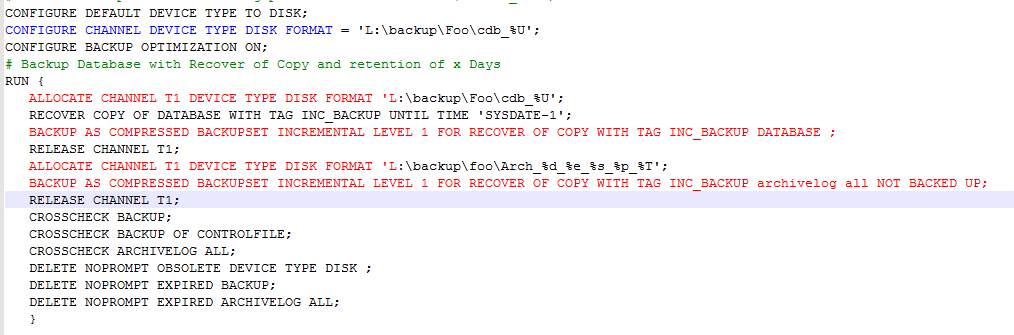
Oracle 19c CDB with 2 user PDBs and archive logging enabled . OS: Windows server - The backup Script:
It’s a 19c CDB backed up using Image copies and incremental backups that will be merged with the copies every 4 days (recover copy Until time sysdate-3 days). - Below is a sample of the script with dummy paths & shorter retention (sysdate-1) but it’s very similar.
2. The recovery scenarios
- Remember to always record the DBID of the database
- Ensure VALIDATE DATABASE/RESTORE, RESTORE ARCHIVELOG ALL VALIDATE are successful
- In order to fully assess my backups, I first choose to try the easy recovery scenarios
- Easy recoveries (all successful)
- Data File Recovery PDB level ✔
- User datafile Drop and recover
- PDB System tablespace drop and recover (CDB needs to be in mount state).
- Data File Recovery CDB level ✔
- ROOT container system tablespace drop and recover
- Loss of spfile in CDB ✔
- Startup NoMount> Recover Spfile from Autobackup> shutdown immediate> startup
- Note: PDBs don’t have spfiles, it’s all stored in PDB_SPFILE$.
2.2 Control file recovery issues
- Restoring/recovering the Controlfile will requires an Open resetlogs no matter if the redo logs or datafiles are still valid. Open Resetlogs means a new Incarnation which brings me to the following questions
Incarnation Questions
- Will the backup cycle be broken after a recovery of a controlfile and a new incarnation ?
- What happens when the subsequent incremental backup is merged with the db copies in 4 days ?
- The copy pointing to the old incarnation number will be merged with an incremental pointing to the new one, does that make the backup invalid ?
- Could we switch back to the previous incarnation after recovery and trick RMAN by still runing daily incremental backups and old image copies merged with new incremental backups ?
3. First Controlfile recovery
- I found out that the recovery of the control file was already complaining. A valid system datafile had to be restored and DB recovered so it can be opened in resetlogs mode, which was odd.
D\**\CONTROLFILE>:>  del \f O1_MF_HSN45YNX_.CTL
RMAN> STARTUP FORCE NOMOUNT;
RMAN>SET DBID 670048894;
RUN
{ SET CONTROLFILE AUTOBACKUP FORMAT
FOR DEVICE TYPE DISK TO '\\backup$\D_controlfile_%F';
RESTORE CONTROLFILE FROM AUTOBACKUP;
}

RMAN> ALTER DATABASE MOUNT;
RMAN> ALTER DATABASE OPEN RESETLOGS;
----------------------- bug ??--------------------------------
ORA-01194: file 1 needs more recovery to be consistent
ORA-01110: data file 1: 'D:\ORACLE\CDB\CDBDEV02\ORADATA\SYSTEM01.DBF'RMAN> restore datafile 1;
Finished restore
RMAN> recover datafile 1;
RMAN-03002: failure of recover command at 09/20/2021 14:32:55
RMAN-06067: RECOVER DATABASE required with a backup or created control file
I did a recover database :
RMAN> RECOVER DATABASE;
Finished recoverRMAN> alter database open resetlogs;
Statement processed
------------------------------------------------------------------------------

RMAN> list incarnation ;

DB Key  Inc Key DB Name  DB ID        STATUS  Reset SCN  Reset Time
------- ------- -------- ------------ ------- ---------- ---------------------
1       1       CDBDEV2 670048894    PARENT  1           28-oct-2020 20:45:50
2       2       CDBDEV2 670048894    CURRENT 17463165117 20-sep-2021 14:51:59
Now we have a new incarnation after resetlogs startup.I know anytime a resetlogs happens, a new backup is required but I still can’t answer my questions about the impact on the backup cycle & the next database copies merge.
So I came up with a bold theory where reverting to incarnation 1 will allow to keep merging copies with the backups. It was stupid but I wanted to try since it was a clone environment. “can’t learn if you don’t break”
My crazy scenario (don’t do this at home)
1. Incarnation was reverted to 1 right before the the evening backup .
2. Next morning I dropped the tablespace system datafile and wanted to recover it =“Epic fail”.
RMAN> run { restore tablespace system; recover tablespace system;}
Finished recover at 21-sep-2021 14:52:17RMAN> alter database open;
ORA-01589: must use RESETLOGS or NORESETLOGS option for database openRMAN> alter database open noresetlogs;
ORA-01588: must use RESETLOGS option for database openRMAN> alter database open resetlogs;
ORA-01190: control file or data file 3 is from before the last RESETLOGS
ORA-01110: data file 3: 'D:\ORACLE\CDB\**\ORADATA\SYSAUX01.DBF'RMAN> validate database root;
List of Datafiles
=================
File Status Marked Corrupt Empty Blocks Blocks Examined High SCN
---- ------ -------------- ------------ --------------- ----------
1 OK 0 6788 68480 17463164895 File Name: D:\ORACLE\CDB\**\SYSTEM01.DBF -- Same with all CDB filesRMAN> restore datafile 3;
RMAN> recover datafile 3;
channel ORA_DISK_1: restore complete, elapsed time: 00:00:03
RMAN-06067: RECOVER DATABASE required with a backup or created control file-- Try full Database Recovery
RMAN> recover database;
ORA-00283: recovery session canceled due to errors
ORA-19912: cannot recover to target incarnation 2RMAN> reset database to incarnation 1;
RMAN> run {
set until SCN 17463165116; # last RESETLOG SCN -1
restore database;
recover database;
}RMAN-03002: failure of recover command at 09/22/2021 10:50:50
ORA-00283: recovery session canceled due to errors
RMAN-11003: failure during parse/execution of SQL statement:
alter database recover if needed start until cancel
ORA-16433: The database or pluggable database must be opened in read/write mode.
Error from the alert.log:
…ORA-01190: control file or data file 1745 is from before the last RESETLOGS
ORA-01110: data file 1745: 'K:\ORACLE\DATA\PTRPTS_DF_3.DBF'
I checked the header value of the data files and confirmed some files weren’t completely recovered
SELECT FHTHR Thread, FHRBA_SEQ Sequence, count(1) --,fhsta STATUS
FROM X$KCVFH group by FHTHR, FHRBA_SEQ –, fhsta STATUS
order by FHTHR, FHRBA_SEQ;
THREAD SEQUENCE COUNT(1) ------- ---------- --------
1 26 4
1 5724 803SQL> SELECT 'ROOT' con_name,status,checkpoint_change#,checkpoint_time,
resetlogs_change#, resetlogs_time, count(*), fuzzy,h.con_id
from v$datafile_header h
where h.con_id=1
Group by status,checkpoint_change#,checkpoint_time,
resetlogs_change#,resetlogs_time, fuzzy,h.con_id
UNION
SELECT p.name,status,checkpoint_change#,checkpoint_time,
resetlogs_change#, resetlogs_time, count(*), fuzzy,h.con_id
from v$datafile_header h, v$pdbs p
where h.con_id=p.con_id
Group by p.name, status,checkpoint_change#,checkpoint_time,
resetlogs_change# ,resetlogs_time, fuzzy,h.con_id
order by con_id;Con_name STATUS CHECKPOINT_CHANGE# CHECKPOINT_TIME RESET_CHANGE# RESETLOGS_TIME COUNT(*) FUZ CON_ID ERROR
---------- ------- ------------------- -------------------- ----------------- -------------------- -------- ---- ------- --------------
ROOT ONLINE 17463165116 20-SEP-2021 14:09:03 1 28-OCT-2020 20:45:50 4 NO 1
PDB$SEED ONLINE 1630255 29-OCT-2020 19:06:11 1 28-OCT-2020 20:45:50 4 NO 2
FSDEMO ONLINE 17463165116 20-SEP-2021 14:09:03 1 28-OCT-2020 20:45:50 194 NO 3
FS_PDB OFFLINE 17463164868 20-SEP-2021 14:07:51 1 28-OCT-2020 20:45:50 605 No 4
Down the rabbit hole
Things went from bad to worse the more I tried to recover the DB an RPO prior to last resetlogs.
I want to just remind few points before I end this long end endless scourge.
- Controlfile recovery from Sep 19th autobackup corresponding to last resetlogs has
- New Incarnation key: 2
- SCN 17463165117 - Seq 5727
- Time 20-sep-2021 14:51:59
- Previous Incarnation key: 1
- Time 28-oct-2020 20:45:50
- I reverted the incarnation to key 1 which was absurd on a hindsight
- Incremental backup kept running
Solution
Case 1: Recover from a new incarnation via manual Controlfile copy
luckily a copy of the initial controlfile was kept aside so I decided to reuse it and try recovering
- Restore the control file using a manual copy
RMAN> startup nomount force;
RMAN> restore controlfile from 'D:\Backup\19c\O1_MF_HSN45YNX_.CTL';
Starting restore at 23-sep-2021 17:11:09
output file name=D:\ORACLE\CDB\CDBDEV2\REDO\CONTROLFILE\O1_MF_HSN45YNX_.CTL
Finished restore at 23-sep-2021 17:11:11RECOVER the database
RMAN> alter database mount;1. Using sequence before the LAST RESETLOGS
SQL> recover database until logseq 5728; -- Resetlogs seq +1
Starting recover at 23-sep-2021 17:26:35
Finished recover at 23-sep-2021 17:29:25
OR
2. Using SCN before the LAST RESETLOGS
run {
set until scn 17463165116; -- Resetlogs SCN -1
recover database;
}--- Check the new incarnation
RMAN> list incarnation;
List of Database Incarnations
DB Key Inc Key DB Name DB ID STATUS Reset SCN Reset Time
------- ------- -------- -------- -------- --------- -----------------
1 1 CDBDEV2 670048894 CURRENT 1 28-oct-2020 20:45RMAN> alter database open resetlogs;
Case 2: Recover from a new incarnation via autobackup
- I was’nt happy with the first/above recovery because in real life you will never have a controlfile handy during a disaster. So I wiped out all the datafiles of the CDB and decided to recover all from scratch
- That’s where RMAN started to ignore image copies which can't even be cataloged (ghosted)
--- We need to recover the last controlfile: From September 21st
Piece Name: \\BACKUP$\.._C-670048894-20210920-01  21-sep-2021 19:38RMAN> Startup nomount
CDBDEV2_CONTROLFILE_C-670048894-20210920-01RMAN> Restore controlfile from '\\BACKUP$\CDBDEV2_CONTROLFILE_C-670048894-20210920-01';
Finished restore at 23-sep-2021 17:11:11
ORA-19563: Recovery ERROR (ghosted backups)
Then a weird error “ORA-19563: datafile copy header validation failed” appeared upon recovery for several backup pieces as RMAN went blind ignoring image copies.
--- Recover database execution
channel ORA_DISK_1: restoring datafile 00053
Input datafile copy RECID=110503 STAMP=1083697667
file name=\\BACKUP$\CDB_DATA_D-CDBDEV2_I-670048894_TS-DPWORK_FNO-53_0VVU1DED
destination for restore of datafile 00053:
D:\ORACLE\CDB\CDBDEV2\ORADATA\PDB\FSDEMO\DPWORK.DBF
ORA-19563: datafile copy header validation failed for file
\\BACKUP$\CDB_DATA_D-CDBDEV2_I-670048894_TS-DPWORK_FNO-53_0VVU1DED
…-->> Image copies are not visible to RMAN and can't even be cataloged.
RMAN> catalog start with '\\BACKUP$\CDB_DATA_D-CDBDEV2_I-670048894_TS-DPWORK_FNO-53_0VVU1DED';
searching for all files that match the pattern ..**FNO-53_0VVU1DED
No files found to be unknown to the database
Workaround
- Created a subfolder 21_backups in the backup location and copy all backups
- Uncatalogued the old backup location and delete the files
- Cataloged the new location (subfolder) containing the copy of all backups.
- Launched a recovery of the database (target RPO Sep 21 14:51:59 )
move backup files to \\BACKUP$\21_backups
-- Catalog old backup location
RMAN> CHANGE BACKUP OF ARCHIVELOG ALL UNCATALOG;
RMAN> CHANGE BACKUP OF DATABASE UNCATALOG;
-- catalog new backup location
RMAN> CATALOG START WITH '\\BACKUP$\21_backups'
915 files found=== RECOVERY ====
RMAN> alter database mount;
RMAN> run
{ set until logseq 5728; -- last resetlogs seq +1
restore database ;
recover database ;
}... applying incremental backups restore
starting media recovery
media recovery failed
===> incarnation 1 recovery is complete oracle wants more
RMAN-00571: ===========================================================
RMAN-00569: =============== ERROR MESSAGE STACK FOLLOWS ===============
RMAN-00571: ===========================================================RMAN-03002: failure of recover command at 09/24/2021 17:51:34
ORA-00283: recovery session canceled due to errors
RMAN-11003: failure during parse/execution of SQL statement:
alter database recover if needed start until cancel using backup controlfile
ORA-00283: recovery session canceled due to errors
ORA-19912: cannot recover to target incarnation 1
RMAN> list incarnation;
DB Key Inc Key DB Name DB ID STATUS Reset SCN Reset Time
------- ------- ------ --------- ------- ------------ -------------------
1 1 CDBDEV2 670048894 CURRENT 1 28-oct-2020 20:45:50
3 3 CDBDEV2 670048894 ORPHAN 17463165117 23-sep-2021 17:50:38 2 2 CDBDEV2 670048894 ORPHAN 17463165117 20-sep-2021 14:51:59
–> target RPO = Inc key 2
- ORA-19912 just confirms all is recovered up to incarnation #1,
Solution
Now we can just roll forward to Target RPO From incarnation key # 2
RMAN> reset database to incarnation 2;    RMAN> recover database ;
Finished recover at 24-sep-2021 18:18:34
RMAN> alter database open resetlogs;
Statement processed
Conclusion
The Rman lesson of the day can be taken off of a quote from THE WIRE “Omar :
"You come at the King ? you best not miss”
That is, don’t mess with the Incarnation after a new resetlogs. Reverting to previous Incarnation will just make things worse and new incarnation rhymes with new backup cycle .
Thanks for reading

 Intro
Intro